Designing AI Workflows with Spaces in SitecoreAI
Introduction: AI workflows need more than prompts
AI is now part of the daily marketing stack. Teams use it to research competitors, summarize audiences, draft campaign briefs, generate landing page copy, localize content, optimize page variants, and speed up repetitive work. But there’s a big difference between using AI for a single task and designing an AI workflow that can support real marketing operations.
A prompt can create a draft. A workflow can move work from strategy to execution.
That distinction matters because modern marketing work rarely happens in one step. A campaign might start with market signals, move into audience research, become a strategic brief, turn into channel-specific content, go through legal and brand review, get translated for multiple regions, then feed into personalization and testing. Each step depends on what came before it. Each step has its own inputs, outputs, decisions, and approvals.
That’s where Spaces in SitecoreAI become useful.
SitecoreAI is positioned as a unified, cloud-native digital experience platform that brings together content operations, digital asset management, content management, conversion optimization, audience insights, and AI-assisted workflows in one connected workspace. It is designed to help marketing teams plan campaigns, create content, personalize experiences, optimize performance, and collaborate across the digital experience lifecycle.
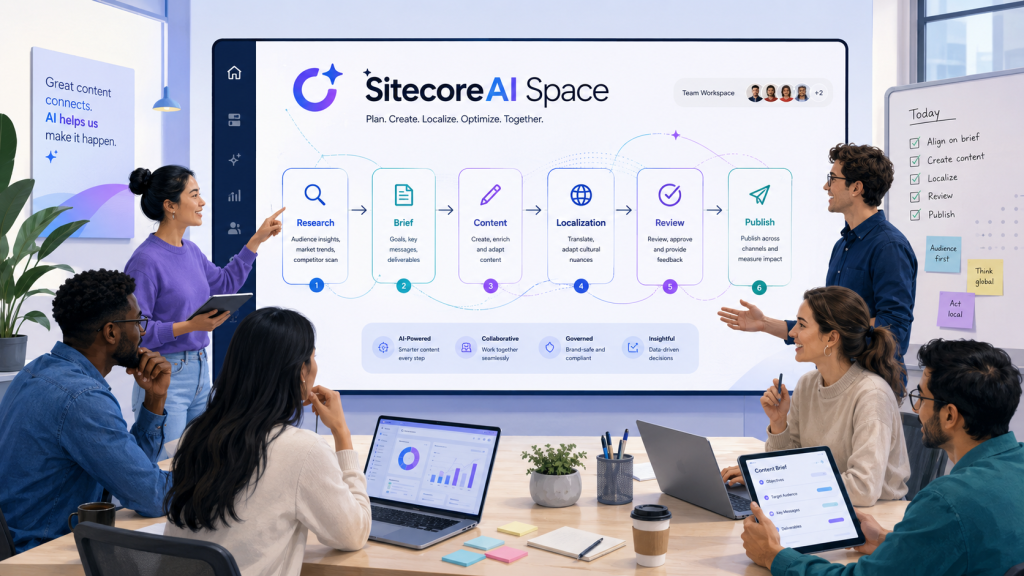
Spaces sit inside this larger idea. They give teams a place to run AI work, collect the outputs, preserve context, and keep multiple agents working toward a shared outcome. Instead of treating AI as a one-off writing tool, Spaces help marketers treat AI as part of an organized production process.
What Spaces are, and why they matter
A Space in SitecoreAI is a working area where AI activity, generated artifacts, and shared context are organized in one place. Sitecore’s documentation describes Spaces as a way to capture related activity, artifacts, and context, so teams can track progress, refine outputs, and collaborate with others. A Space can be created manually or started from a chat.
That sounds simple, but it changes how AI work is managed.
Without a Space, AI work can become scattered. One person has the research summary in a chat. Another has the brief in a document. A third has localized copy in a spreadsheet. Someone else has the final landing page draft in the CMS. Context gets lost. Versions multiply. Nobody is quite sure which output is current.
A Space gives that work a home.
Inside a Space, generated outputs are stored as artifacts. A Space can also include agents, instructions, shared context, and collaboration points. When you open a Space, SitecoreAI organizes it into a main pane for generated artifacts and results, plus a right pane for Agents and Instructions. The main pane can be viewed in Classic, Chat, or Canvas mode, depending on how the team wants to review and work with the content.
That makes Spaces especially useful for multi-step marketing work. A Space isn’t just where you ask AI for help. It’s where the workflow lives.
From one-off AI tasks to multi-step orchestration
Most marketing teams start with AI in a simple way: “Write me an email,” “Summarize this report,” or “Give me campaign ideas.” These are useful tasks, but they’re limited. The output often needs to be copied somewhere else, rewritten for brand voice, checked against audience strategy, adapted for channels, and approved.
A multi-step workflow works differently. It defines a sequence of actions. Each step produces something that the next step can use. The team can review the work along the way, add context, change direction, and keep the process moving.
In SitecoreAI, this is where Flows become important. Sitecore defines flows as structured, end-to-end workflows that automate complex marketing processes by coordinating AI-driven and human-assisted steps toward a common goal. In Agentic Studio, flows connect multiple agents, organize work into stages, and include human review or approval points where needed.
A flow can break complex work into stages, maintain context through the process, enable agent handover, and include human review. This is the backbone of useful AI orchestration. It lets a campaign move from research to brief to content to localization without restarting from scratch at each step.
Sitecore’s March 2026 changelog also highlights a more consistent setup for running agents, flows, and Spaces using inputs, parameters, context, items, or files. The same update notes that teams can chain agents in sequence, for example research, content generation, then translation, within a single Space.
That sequencing is the key. A good AI workflow is not a pile of disconnected outputs. It is a chain of decisions and artifacts.
The role of agents in a Space
Agents are the workers inside the workflow. Sitecore describes agents as the foundation of automated work in SitecoreAI. They can set goals, take initiative, make decisions, adapt based on feedback, and coordinate with people or other agents. In Agentic Studio, agents act as digital workers that automate marketing tasks while following defined rules, workflows, and guidelines.
SitecoreAI includes prebuilt agents for common marketing tasks, such as Researcher, Brief Generator, Blog Writer, Bulk Content Generator, Competitor Analyzer, Email Writer, Audience Summary, Market Signals, Structured Content Extractor, Summarizer, and Translator.
The value of a Space is not just that you can run one of these agents. The value is that you can run them in context.
For example, a Researcher agent might create a summary of competitor messaging. A Brief Generator can then use that research to draft a campaign brief. A Content Generator can turn the brief into a landing page. A Translator can localize the content into Spanish and German. Each agent builds on what came before.
SitecoreAI also allows agents to run independently or together in flexible ways, including running multiple agents in parallel, chaining agents so each step builds on previous output, and sharing context and results across agents.
That flexibility is where workflow design starts. The team has to decide which work should happen in sequence, which work can happen in parallel, and where human review belongs.
Designing the workflow before running the workflow
A Space will only be as useful as the workflow design behind it. Before creating a Space, teams should answer a few practical questions.
What is the business outcome?
What decisions need to be made before content is created?
Which inputs are required?
Which outputs should be created at each stage?
Who reviews each output?
What gets converted into a CMS item, campaign deliverable, or reusable asset?
What should be localized, personalized, or tested?
These questions matter because AI is very good at producing content, but marketing operations need more than content. They need traceability, consistency, ownership, and a repeatable path from idea to delivery.
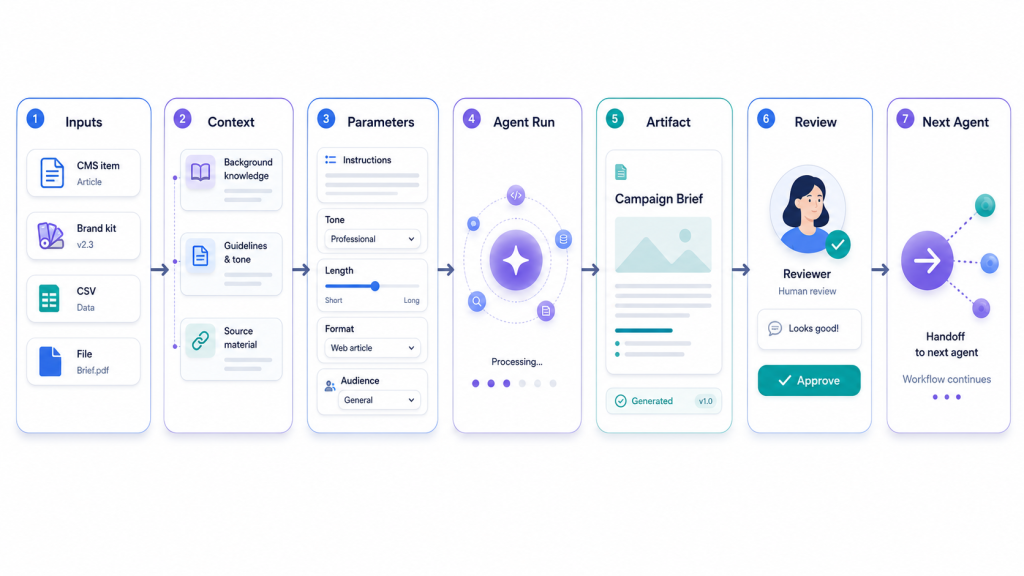
A useful design pattern is to treat every AI workflow as a production line with checkpoints. The workflow should define:
- Inputs: what the agent needs to know or act on.
- Context: background information that shapes the output.
- Parameters: choices that affect the result, such as target language or channel.
- Artifacts: outputs created by agents or flows.
- Review points: places where humans validate, edit, approve, or redirect.
- Downstream actions: what happens to the artifact after it is accepted.
In SitecoreAI, this maps closely to how Spaces are configured. When creating or expanding a Space, users can add items, context, and supporting files. Items can include CMS content, artifacts from Spaces, briefs from the Strategy app, or CSV data. Context can include artifacts and brand kits. Supporting files can be uploaded to provide more information for the request.
This structure gives teams a practical framework. Instead of writing a vague prompt, they can assemble a clear package of inputs and context for each agent.
Inputs: what the workflow needs to start well
The quality of an AI workflow depends heavily on the quality of its inputs. If the inputs are vague, incomplete, or inconsistent, the outputs will need more manual cleanup.
In a Space, inputs can take several forms.
The first input is the objective. This tells the workflow what it is trying to accomplish. A clear objective might be: “Create a launch campaign for a new enterprise security product aimed at CIOs in financial services,” or “Localize this landing page for Latin American Spanish while preserving the brand’s formal tone.”
The second input is the source item. This is the content, artifact, brief, file, or dataset the agent will act on. SitecoreAI supports adding CMS content items, previously generated artifacts, briefs, and CSV data as items for agents to process.
The third input is brand context. Brand context is critical because AI-generated content can easily sound generic. SitecoreAI supports brand-aware AI, and when a brand kit is assigned to a site, generated or optimized content can take brand context, dos and don’ts, and tone of voice into account.
The fourth input is audience context. This includes personas, segments, funnel stage, region, account tier, customer pain points, and preferred messaging angles. A workflow for first-time visitors should not produce the same copy as a workflow for returning customers. SitecoreAI’s personalization documentation gives a simple example: first-time visitors can be shown introductory copy, while returning visitors can be shown shorter copy focused on what’s new.
The fifth input is operational context. This includes the channel, deadline, market, compliance notes, offer details, campaign timing, and stakeholder requirements. For campaign workflows, this context keeps AI from producing content that may be creative but unusable.
The sixth input is performance context. If the workflow is designed for optimization, it should include analytics, conversion goals, or known performance issues. SitecoreAI supports A/B/n testing with AI-optimized content variants, allowing teams to compare variants against business goals such as increasing page views, reducing bounce rate, or reducing exit rate.
A practical rule: every agent run should have a defined input owner. If nobody owns the input, nobody owns the quality of the output.
Outputs: what the workflow should produce
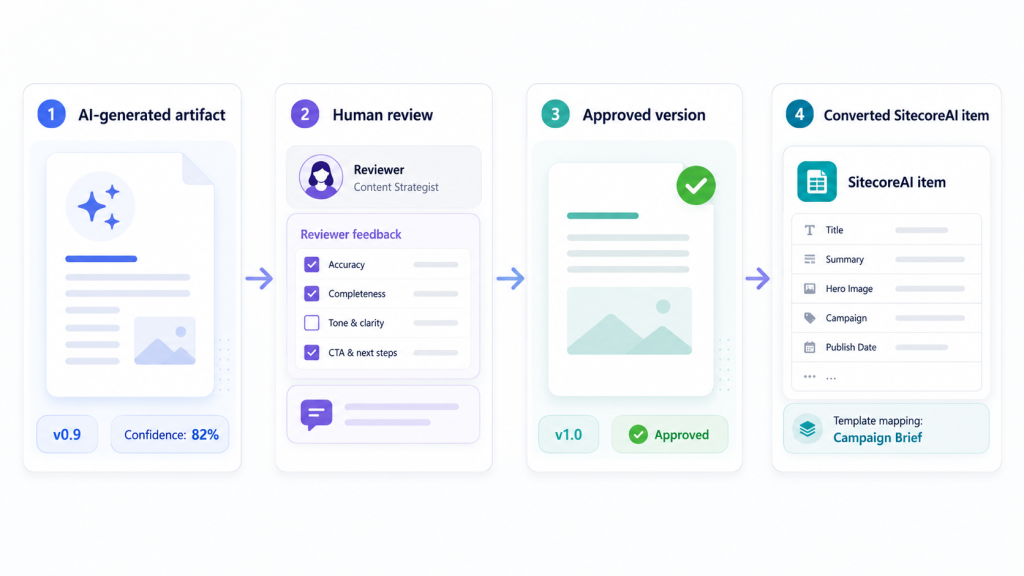
In SitecoreAI, the main output of an agent or flow is an artifact. Sitecore defines an artifact as a standalone, editable content block that represents the result of an AI-driven task. Examples include a research summary from the Researcher agent, a campaign brief from the Brief Generator agent, or social media content from the Bulk Content Generator.
Artifacts are important because they turn AI output into something the team can inspect, refine, version, and reuse. A good workflow should define the expected artifact for each step.
For example:
Research step: competitor messaging summary.
Brief step: campaign brief with objective, audience, key message, offer, channels, and success metrics.
Content step: landing page draft, email sequence, paid media copy, and social posts.
Localization step: translated and culturally adapted versions by market.
Review step: approved artifact with final edits.
Delivery step: converted SitecoreAI item or campaign deliverable.
Some artifacts can include structured fields, such as title, objective, or body content. SitecoreAI allows those fields to be edited separately, refined with AI, or evaluated with confidence scores.
Confidence scores are especially useful for workflow governance. SitecoreAI can show whether a structured field is Known, Assumed, or Generated. Fields marked Assumed or Generated should be reviewed or clarified, because they may be inferred from available context or created without a direct source.
That changes the review conversation. Instead of asking, “Do we trust the whole draft?” a team can ask, “Which fields came from known input, which were assumed, and which need review?”
A strong workflow does not treat the first artifact as final. It treats the first artifact as a structured draft that can be refined.
Human review is part of the workflow, not a delay
A common mistake in AI workflow design is to think automation means removing people. That is not the right goal for marketing work. The better goal is to use AI to handle repetitive, time-consuming steps while humans make the decisions that require judgment.
Sitecore’s glossary defines human-in-the-loop as a design approach where AI systems pause for human input, feedback, or approval at key stages to ensure quality, accuracy, and accountability.
In practice, this means placing review points where risk is highest.
A campaign brief should be reviewed before content generation starts. A technical claim should be reviewed before publication. A legal disclaimer should be reviewed before localization. A translation should be checked before it goes live in a market. A performance optimization should be tested before it replaces the control.
Spaces support this by keeping the work and its history visible. Teams can review artifacts, refine them manually, use AI to rewrite fields, answer AI-generated clarification questions, and compare artifact versions.
This matters because review is not just about approval. It is also about learning. When a marketer edits an artifact, answers a clarification question, or refines a field, the workflow becomes more accurate for the next step.
Versioning, refinement, and traceability
Marketing content changes constantly. A campaign brief may shift after stakeholder review. A landing page may need a stronger CTA. A translation may need local terminology changes. A compliance team may ask for more precise language.
Spaces help teams manage these changes because artifacts can have multiple versions. SitecoreAI allows users to edit artifact content directly, save changes as new versions, refine fields with AI, refine an artifact through chat, and compare versions to review what changed.
This is valuable for two reasons.
First, it reduces confusion. The team can see the difference between the original AI draft and the reviewed version.
Second, it creates a better handoff. When the next agent uses a reviewed artifact as input, the workflow continues from the approved version, not from an outdated draft.
For example, imagine a campaign workflow where the Brief Generator creates v1 of a brief. The campaign manager edits the target audience and value proposition, creating v2. The legal reviewer adjusts a product claim, creating v3. The Content Generator should use v3, not v1.
That is simple in theory, but it is exactly the kind of operational detail that breaks down when AI work happens across disconnected tools.
Converting artifacts into usable SitecoreAI items
The end of an AI workflow should not be a copy-and-paste exercise. If the team has to manually recreate every approved artifact somewhere else, the workflow loses efficiency and introduces errors.
SitecoreAI supports converting artifacts generated within a Space into structured SitecoreAI items. This allows teams to move from an AI-generated artifact to usable content without copying or recreating it manually. The conversion process includes selecting a site collection and site, choosing an available template such as an Article Page template, selecting a location in the content tree, and converting the artifact into an item.
This is where workflow design connects to content architecture.
Before running a workflow, teams should know what the final content item should become. Is it an article page? A campaign landing page? A reusable content block? A localized page variant? The better the team understands the destination, the better it can structure the upstream artifact.
A useful practice is to define output templates at the start of the workflow. For example:
Campaign brief artifact: structured fields for objective, audience, offer, key message, channels, KPIs, and approvals.
Landing page artifact: hero headline, subheadline, body modules, proof points, CTA, SEO metadata, and compliance notes.
Localization artifact: source copy, translated copy, glossary terms applied, regional notes, and reviewer status.
The more structured the artifact, the easier it is to review, transform, and publish.
Real-world workflow 1: Campaign strategy to launch assets
Campaigns are one of the strongest use cases for Spaces because campaign work is naturally multi-step. It requires strategy, audience understanding, creative development, content production, approvals, and measurement.
Sitecore Stream’s campaign orchestration capability provides a unified workspace to manage campaigns across the marketing campaign lifecycle. Sitecore’s documentation describes campaign types such as product launches, digital ad strategies, website updates, and seasonal promotions. It also describes a campaign management process that includes creating a campaign, adding deliverables, adding tasks, editing campaign details, and monitoring progress.
A Space can support the AI side of that work.
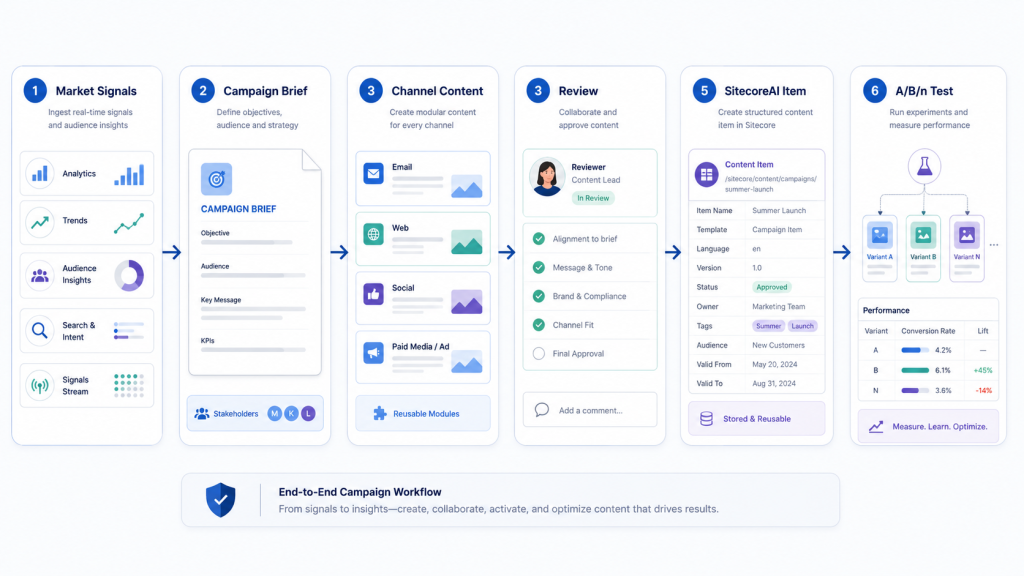
Here is a practical campaign workflow pattern.
Step 1: Start with market and audience research
The team creates a Space for the campaign, for example: “Q4 Enterprise Security Launch.” The objective is clear: create a campaign for CIOs and security leaders in mid-market financial services.
The first agent run uses a Researcher or Market Signals agent to collect market trends, competitor positioning, customer concerns, and current industry language. SitecoreAI Signals are designed to surface real-time insights, trends, news, updates, or shifts related to a chosen topic, shaped by preferences such as topic, industry, and prompt.
The output is a research artifact. It should include competitor themes, audience pain points, common objections, regulatory concerns, and messaging opportunities.
Step 2: Generate the campaign brief
Next, the Brief Generator uses the research artifact, brand kit, campaign objective, audience details, and product information as inputs. The output is a structured campaign brief.
A strong brief artifact should include:
Campaign objective
Primary audience
Secondary audience
Core insight
Positioning statement
Key message
Proof points
Offer
Primary CTA
Channels
Tone guidance
Risks and compliance notes
Success metrics
This brief becomes the foundation for the rest of the campaign. It should be reviewed by the campaign manager before any content is generated.
Step 3: Generate channel-specific content
Once the brief is approved, the team adds a Content Generator or Bulk Content Generator agent. SitecoreAI includes a Bulk Content Generator for creating content for multiple audiences and channels at the same time.
The agent can generate a landing page draft, email sequence, paid social variations, webinar invite copy, sales enablement snippets, and short-form posts. The key is to use the approved brief as context so each output is aligned.
The team should not ask for “campaign content” in one vague prompt. It should define each expected output. For example:
Landing page: 900 words, executive tone, CTA to book a demo.
Email 1: awareness, 120 words, problem-led subject line.
Email 2: proof, 150 words, includes customer outcome.
LinkedIn post: 90 words, thought leadership angle.
Paid ad: three variations, under character limits.
Specific outputs create cleaner artifacts.
Step 4: Review and refine
The campaign manager reviews the artifacts. The brand team checks tone. The product team checks claims. Legal checks compliance language. Each reviewer can focus on the artifact fields that matter to them.
If structured fields show low confidence or are marked as Assumed or Generated, those fields should be reviewed carefully. SitecoreAI’s artifact confidence scoring can help teams identify which fields are based on user-provided information, inferred from context, or generated without a direct source.
Step 5: Convert approved content into SitecoreAI items
Once the landing page artifact is approved, the team can convert it into a SitecoreAI item, choosing the correct site, template, and content location.
The campaign is no longer stuck as a draft in a chat. It becomes part of the content system.
Step 6: Optimize and test
After publication, the team can use AI-assisted content optimization and A/B/n testing. SitecoreAI supports optimizing written content in a component, creating an A/B test between original and AI-optimized content, assigning traffic, setting goals, and viewing analytics after the test is live.
This closes the loop. The workflow does not end at content generation. It continues into performance learning.
Real-world workflow 2: Localization at scale
Localization is another strong use case for Spaces because it requires both automation and careful human review.
Translation is not just swapping words between languages. Good localization preserves meaning, tone, terminology, cultural relevance, legal accuracy, and market expectations. This is where inputs and context matter.
SitecoreAI provides AI-assisted translation for localizing marketing content across pages and entire sites. It supports translating individual pages, full sites, and content items. It also includes a Translation Assistant agent for reviewing, refining, and adjusting translations interactively within Agentic Studio.
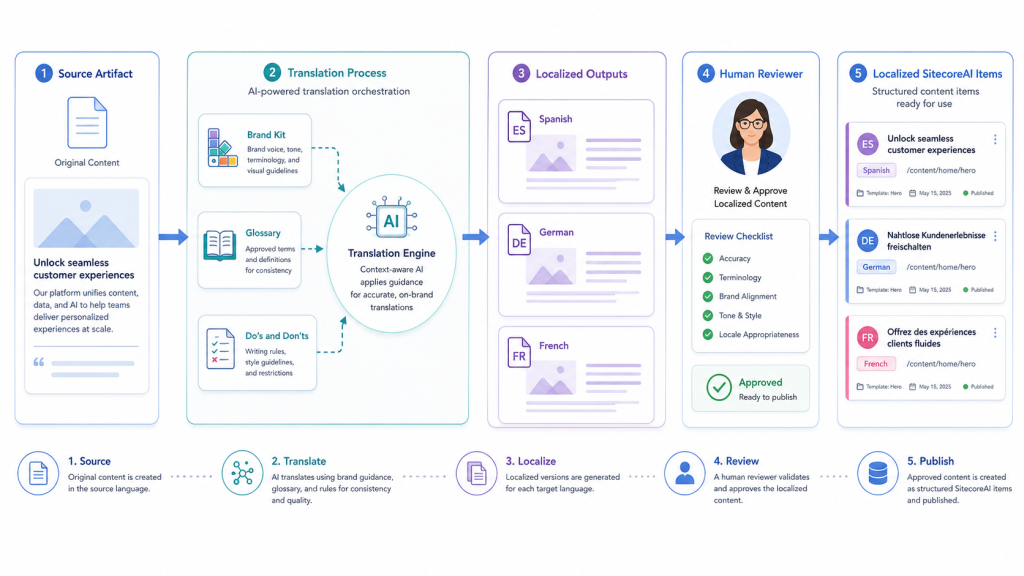
A practical localization workflow might look like this.
Step 1: Select the source content
The team starts with an approved source artifact or SitecoreAI content item. This could be a campaign landing page, article, product page, or email sequence.
The source should be final enough to translate. Translating unstable content creates rework. If the English version is still changing daily, localization teams will spend time fixing outdated translations.
Step 2: Add brand and terminology context
SitecoreAI can apply guidance from a brand kit during site or page translation. The documentation notes that when a brand kit is assigned to a site, AI can apply relevant brand kit sections such as Glossary and Localization and Do’s and Don’ts during translation.
This is important because every brand has terms that should be translated, terms that should stay in English, and terms that require specific regional phrasing.
For example, a software company may want “zero trust” translated in one language but kept as an English term in another. A retail brand may want product category names localized but campaign slogans adapted more freely. A healthcare brand may need exact approved terminology.
SitecoreAI’s translation guidance follows a specific order: it uses Glossary and Localization terms when available, falls back to Do’s and Don’ts if no glossary terms are defined, and uses general language understanding if neither is available or no brand kit is assigned.
That order should shape the workflow. Glossary work should happen before translation, not after.
Step 3: Run the Translator agent
Within a Space, the team can add the Translator agent, select the approved artifact as the item to act on, and choose parameters such as target languages. Sitecore’s documentation gives an example of selecting a brief artifact generated by a first agent, then using the Translator to work on that artifact and generate content based on selected parameters such as Spanish and German.
The output is a set of localized artifacts.
Step 4: Review for language, culture, and intent
Human review is especially important in localization. The reviewer should not only ask whether the translation is grammatically correct. They should check:
Does the message still match the campaign strategy?
Does the tone fit the market?
Are glossary terms applied correctly?
Are product claims still accurate?
Do examples, idioms, or CTAs need adaptation?
Are legal or compliance statements unchanged where required?
Does the translated page fit design constraints?
The reviewer can manually edit the artifact, use AI to refine fields, or chat with the artifact to adjust tone, length, or market-specific phrasing. SitecoreAI supports direct editing, AI-assisted field refinement, chat-based artifact refinement, and automatic versioning.
Step 5: Convert localized artifacts into content items
Once approved, the localized artifact can be converted into the correct SitecoreAI item or used in the relevant localized page workflow. The key is to keep the translation artifact connected to the approved source context, so the team knows what was translated, what was changed, and which version was accepted.
Step 6: Measure and improve
Localization should not be treated as a one-time task. Regional performance should inform future workflows. If a CTA performs poorly in one market, the next workflow should include that learning as input. If a translated term causes confusion, the glossary should be updated before the next translation run.
A Space helps preserve the work history so the next localization cycle can build on what the team learned.
Real-world workflow 3: Personalization and content variants
Personalization is a strong use case for Spaces because it often requires multiple versions of similar content. Teams need to adapt messaging for different audiences without losing brand consistency.
SitecoreAI supports AI-assisted personalization by allowing teams to create page variants for specific audiences and optimize content for those variants. The documentation gives an example of showing first-time visitors introductory copy and returning visitors a shorter version focused on what’s new.
A personalization workflow in a Space could start with an approved landing page artifact. The team adds audience context for three segments:
First-time visitor
Returning visitor
Decision maker from target account
The Content Generator creates three variant artifacts. Each version uses the same core message but changes the emphasis.
The first-time visitor version explains the problem and introduces the brand.
The returning visitor version focuses on new capabilities.
The target-account version references industry-specific challenges and stronger proof points.
The team reviews each artifact, then converts approved versions into the proper content items or page variants. The final variants can be tested and measured through SitecoreAI’s optimization and A/B/n testing capabilities.
This is where Spaces can prevent content drift. Instead of generating three unrelated versions, the workflow keeps all variants tied to the same brief, source artifact, brand kit, and audience strategy.
Designing inputs and outputs as a matrix
For repeatable workflows, teams should document inputs and outputs in a matrix. This helps marketers, content strategists, and developers agree on what each step requires and produces.
Here is a practical example for a campaign workflow:
| Workflow step | Agent or action | Required inputs | Context | Output artifact | Human review |
|---|---|---|---|---|---|
| Research | Researcher or Market Signals | Topic, industry, competitors | Audience, region, offer | Research summary | Strategist |
| Brief | Brief Generator | Research artifact, objective | Brand kit, product notes | Campaign brief | Campaign manager |
| Content | Content Generator | Approved brief | Channel requirements | Landing page, email, social | Brand and product |
| Localization | Translator | Approved content artifact | Glossary, localization rules | Localized content | Regional reviewer |
| Optimization | Optimize content or A/B/n test | Published page or component | Conversion goal | Variant content | Growth team |
| Publishing | Convert artifact | Approved artifact | Template and site location | SitecoreAI item | Content owner |
A matrix like this prevents ambiguity. It also helps teams decide when to use a single agent, when to use a flow, and when to create a Space from scratch.
SitecoreAI supports starting a Space from bulk updates, content creation, scratch, or an existing template. Existing template flows include Adaptive Optimization, Context-Aware Content, and ABM Campaign.
That gives teams a few practical paths. If the task is simple, run one agent. If the task has several linked stages, use a flow. If the work is exploratory or custom, start from scratch and add agents as needed.
Governance: keeping AI useful and safe
AI workflows need governance, but governance should not feel like a wall. It should feel like guardrails that keep the workflow reliable.
A good governance model for Spaces should cover five areas.
1. Brand governance
Brand context should be included before content generation starts. SitecoreAI’s brand-aware AI can use brand kit sections such as brand context, dos and don’ts, and tone of voice when a brand kit is assigned to a site.
This reduces generic output and helps teams maintain consistency across campaigns, channels, and markets.
2. Source governance
Every workflow should separate known information from assumed information. If a product claim comes from an approved source, mark it as known. If AI inferred it, review it. Artifact confidence labels can help teams identify fields that need clarification.
3. Review governance
Review should happen at defined checkpoints. For example, review the brief before content creation, review claims before localization, and review localized content before publishing.
4. Version governance
Teams should use artifact versioning intentionally. The reviewed version should become the input for the next step, not the first draft. SitecoreAI supports artifact versioning and comparison, which helps teams understand what changed between versions.
5. Publishing governance
Approved artifacts should be mapped to the right templates and locations before conversion. SitecoreAI supports converting artifacts into structured items by selecting the site, template, and content tree location.
Governance is not about slowing AI down. It is about making AI work safe enough to scale.
Collaboration inside Spaces
AI workflows are rarely owned by one person. A campaign might involve strategy, content, design, product marketing, legal, localization, analytics, and web production. Spaces are useful because they make the work visible across roles.
Within a Space, teams can review artifacts, chat in context, add agents, manage collaborators, change status, and continue working from previous results. Sitecore’s Spaces documentation notes that users can add collaborators, manage generated artifacts, chat within the Space, run additional agents, convert artifacts into SitecoreAI items, and change the status of a Space.
This supports a more realistic marketing process. The strategist does not need to send the brief to a separate AI tool. The writer does not need to recreate the research. The localization manager does not need to ask which English version was final. The web producer does not need to copy text from a loose document.
Everyone works from the same history.
Common workflow design mistakes
Even with Spaces, teams can still design weak workflows. Here are the common mistakes to avoid.
Mistake 1: Starting with content before strategy
If the first step is “write the landing page,” the workflow may move quickly in the wrong direction. Start with research, audience context, and a brief.
Mistake 2: Treating brand context as optional
Brand context is not decoration. It changes the usefulness of the output. Without brand guidance, AI content can sound polished but generic.
Mistake 3: Using one huge prompt for everything
A giant prompt that asks for research, strategy, copy, localization, and optimization in one run may produce a large output, but it is hard to review. Multi-step workflows are easier to control.
Mistake 4: Failing to define output formats
If the team does not define what the artifact should contain, the output may be hard to reuse. Structured artifacts are easier to review, convert, and publish.
Mistake 5: Skipping human review
AI can accelerate work, but humans still need to validate claims, audience fit, legal requirements, brand voice, and market relevance.
Mistake 6: Localizing before the source is stable
If the source content changes after translation starts, localization teams have to redo work. Translate from an approved source artifact.
Mistake 7: Not closing the performance loop
A workflow should not end at publishing. If the content is tested, personalized, or optimized, the results should become input for the next workflow.
A practical blueprint for building your first Space workflow
Here is a simple blueprint a team can follow.
Step 1: Name the Space around the outcome
Use a name that reflects the business goal, not the tool action. For example, “Spring Product Launch Campaign” is better than “AI content test.”
Step 2: Write the objective clearly
Define the goal, audience, channel, market, and success metric. The objective should be clear enough that a new team member can understand why the Space exists.
Step 3: Add trusted inputs
Add approved briefs, CMS items, previous artifacts, CSV data, or supporting files. SitecoreAI allows agents to act on items such as CMS content, artifacts, briefs, and CSV data.
Step 4: Add context
Include brand kits, prior artifacts, localization rules, campaign notes, and audience definitions. Context should guide the agent, not overwhelm it.
Step 5: Choose the workflow pattern
Use a single agent for a focused task. Use a flow for multi-stage work. Start from scratch when the process is exploratory. SitecoreAI supports pre-configured flows and allows teams to add one or more agents within a Space.
Step 6: Run the first agent
Start with the step that reduces uncertainty. For campaigns, this is often research or audience summary. For localization, it is source validation and glossary preparation. For optimization, it is performance analysis.
Step 7: Review the artifact
Check quality, confidence, assumptions, and missing details. Answer follow-up questions if AI identifies unclear fields. SitecoreAI can generate follow-up questions for structured fields that need clarification.
Step 8: Run the next agent using the reviewed artifact
Do not build the next step on an unreviewed draft. Use the approved or refined artifact as the next input.
Step 9: Convert or publish only after approval
When the artifact is ready, convert it into a SitecoreAI item or use it in the relevant publishing workflow.
Step 10: Capture learning
After launch, record what worked. Winning messages, weak CTAs, localization issues, and review notes should inform the next Space.
What good looks like
A well-designed Space workflow has a few visible signs.
The objective is clear.
The inputs are trusted.
The agents have enough context.
Each step produces a defined artifact.
Humans review the right moments.
Versions are easy to compare.
Approved artifacts become usable content.
Localization uses glossary and brand rules.
Optimization connects to measurable goals.
The next campaign can reuse what the team learned.
This is the real value of Spaces in SitecoreAI. They help teams move from AI experimentation to AI-supported operations.
Conclusion: Spaces turn AI into a working system
AI is most useful when it is connected to the way teams already work. Marketers do not just need faster drafts. They need better handoffs, clearer context, stronger governance, and a repeatable way to move from idea to execution.
Spaces in SitecoreAI support that shift. They give teams a shared place to run agents, organize artifacts, preserve context, review outputs, refine versions, and convert approved work into usable content. Flows add orchestration by connecting agents into multi-step processes with handoffs and human review. Inputs and outputs give the workflow structure. Campaign and localization use cases show how the model works in real marketing operations.
The best AI workflows are not the ones that remove every human step. They are the ones that put human judgment in the right places and let AI handle the heavy, repetitive work around it.
That is the practical promise of designing AI workflows with Spaces: not just faster content, but a more connected, controlled, and scalable way to deliver digital experiences.