Creating Language Versions Using Sitecore Stream in Sitecore XP
Table of content
Introduction
- Why multilingual content matters today
- Where Sitecore XP fits in the digital experience landscape
- The role of Sitecore Stream
Understanding Multilingual Management in Sitecore XP
- Language versioning concepts
- Item versioning vs. language versioning
- Culture codes and regionalization differences
- The impact on templates, layouts, and media
Deep Dive into Sitecore Stream
- What Sitecore Stream is, architecture, and positioning
- How it connects to workflows and publishing
- Benefits vs. manual versioning
Setting Up the Environment
- Prerequisites, permissions, roles
- Adding and configuring new languages
- Designing a language-aware workflow
- Setting default language and fallback
Step-by-Step: Creating Language Versions
- Adding versions manually
- Bulk creation of versions with Sitecore Stream
- Managing fields, shared vs. unversioned fields
- Screenshots/diagrams (mockups to illustrate steps)
- Handling media library translations
Translation & Localization Workflows
- Internal translation vs. external connectors
- Export/import pipelines
- Common workflow models (centralized vs. decentralized teams)
- Diagram of a translation loop
Troubleshooting & Pitfalls
- Common editor mistakes
- Language selector issues
- Version conflicts
- Performance considerations for large multilingual trees
Best Practices & Governance
- Content governance structures
- Defining a “master language” strategy
- Metadata and SEO localization
- Scaling with multiple regions
- Security & permissions by language
Advanced Use Cases
- Integration with translation APIs (Smartling, Lionbridge, etc.)
- Personalization by language and culture
- Analytics & reporting by language
Conclusion
- Key takeaways
- Future outlook on multilingual Sitecore XP management
Introduction
Why Multilingual Content Is No Longer Optional
Today, every organization with an online presence faces one unavoidable truth: your audience speaks more than one language.
- Global commerce: A U.S.-based e-commerce brand selling shoes might reach customers in France, Brazil, and Japan within days of launching online ads.
- Regulations: In Canada, government and healthcare websites must legally publish in both English and French. In Europe, GDPR compliance requires some disclosures to appear in local languages.
- User expectations: Studies repeatedly show that users are more likely to engage, stay longer, and convert when content appears in their native tongue.
Multilingual support isn’t just a marketing “nice-to-have.” It’s now a competitive requirement.
But simply translating text isn’t enough. Digital experience platforms need to:
- Manage multiple versions of the same content.
- Keep workflows intact across languages.
- Ensure layouts, metadata, and media also match language and cultural context.
- Track progress so editors know what’s missing or outdated.
That’s where Sitecore XP comes in — and more specifically, where Sitecore Stream helps operationalize the process.
Where Sitecore XP Fits
Sitecore XP is built for enterprise-level digital experience management. It doesn’t just serve static content:
- It personalizes experiences based on visitor profile data.
- It tracks analytics to show which content performs better.
- It allows versioning, branching, and scaling across massive content trees.
When dealing with multilingual content, Sitecore XP has a built-in language versioning system. But manually managing hundreds (or thousands) of items across 10+ languages quickly becomes overwhelming.
Enter Sitecore Stream.
What Sitecore Stream Is
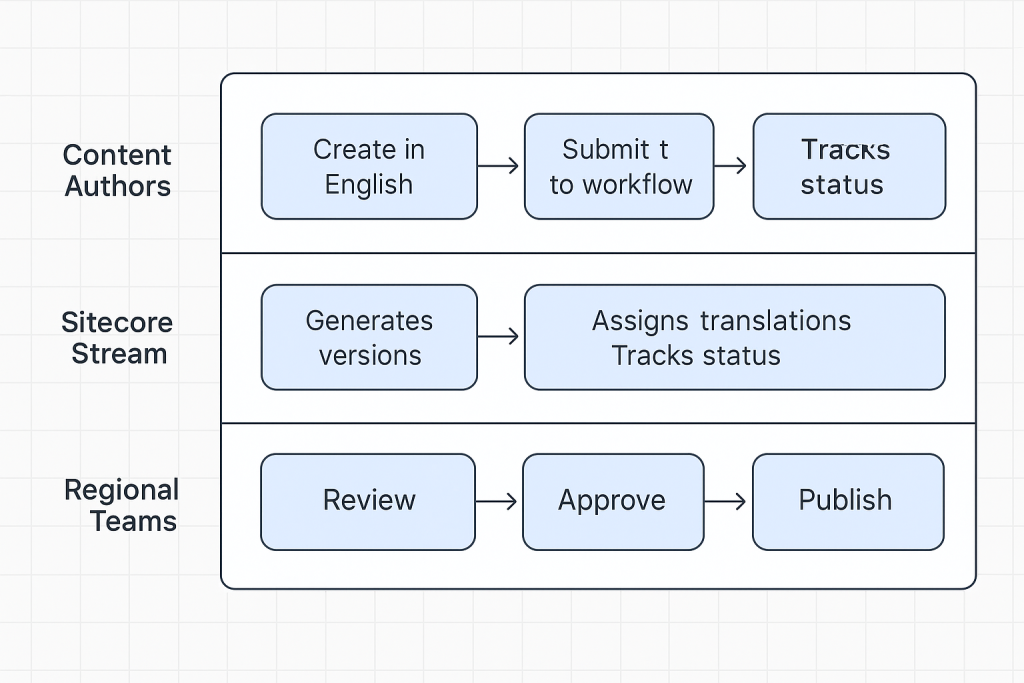
Think of Sitecore Stream as a layer of workflow automation that sits on top of Sitecore’s multilingual features. It helps:
- Create multiple versions at once (instead of item by item).
- Assign translation tasks through workflows.
- Track translation progress and version states.
- Reduce human error by enforcing governance.
In other words, Stream takes the heavy lifting out of multilingual management.
Understanding Multilingual Management in Sitecore XP
Before jumping into steps, let’s ground ourselves in how Sitecore handles languages under the hood.
Language Versioning Concepts
In Sitecore, an item is the atomic unit of content. Every page, every piece of text, every media file is an item.
Each item can have:
- Shared fields (content common across all languages, e.g., IDs, layout references)
- Unversioned fields (fields that can differ by language but not by version, e.g., images)
- Versioned fields (fields that change across both language and version, e.g., text body)
This model allows one item to carry multiple language versions, rather than duplicating the item per language.
Example:
| Path to the item | Language | Version | Translation |
|---|---|---|---|
| /sitecore/content/Home | en | v1 | Welcome |
| /sitecore/content/Home | fr | v1 | Bienvenue |
| /sitecore/content/Home | es | v1 | Bienvenido |
This saves duplication, but requires discipline.
Item Versioning vs. Language Versioning
Two terms often confuse newcomers:
- Item Versioning = changes within the same language (e.g., editing English homepage v1 → v2).
- Language Versioning = parallel content across languages (e.g., English vs. French).
Together they form a grid:
| Language | Item Version | Language Version |
| EN | V1 | V1 |
| FR | V1 | V2 |
| ES | V1 | V1 |
Culture Codes and Regionalization
Not all “languages” are equal. French (fr-FR) differs from French Canadian (fr-CA). The same applies for Spanish in Spain (es-ES) vs. Mexico (es-MX).
Sitecore uses ISO culture codes to distinguish these. Editors must be precise — otherwise you risk mixing translations or publishing the wrong locale.
✅ Tip: Always clarify whether your business needs “language only” or “language + region”.
The Impact on Templates, Layouts, and Media
Languages in Sitecore aren’t limited to text. You must consider:
- Templates: Field names and standard values should be multilingual-ready.
- Layouts: Ensure design supports longer/shorter text lengths (e.g., German tends to be longer).
- Media: Some images, videos, or PDFs may need localized versions.
Why Sitecore Stream Matters Here
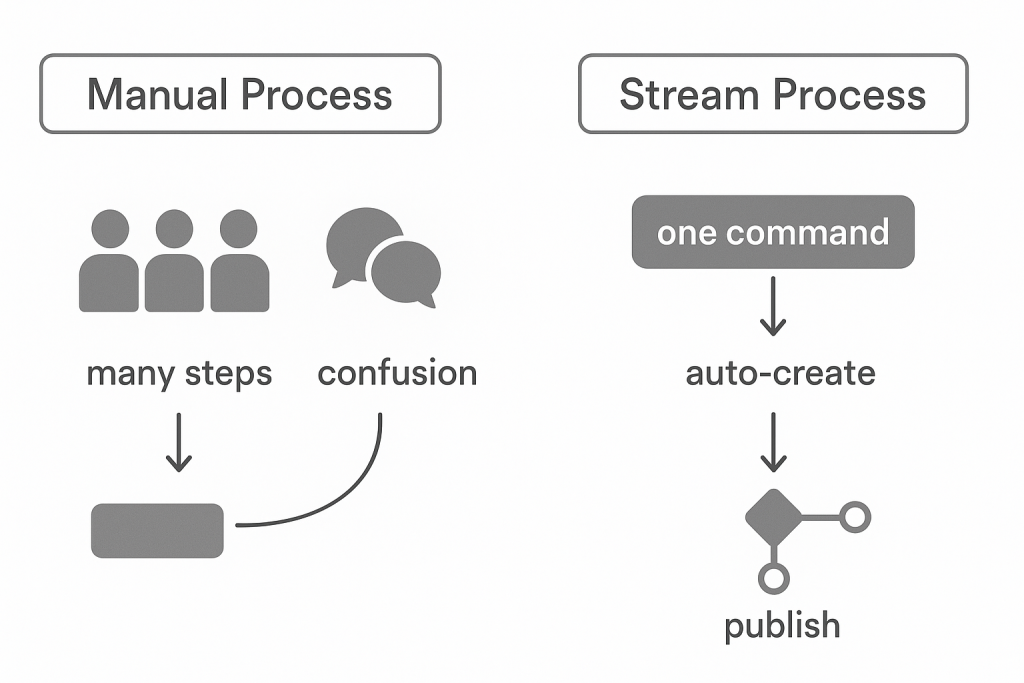
Without Stream, managing these versions means:
- Manually adding versions one by one.
- Tracking status in spreadsheets.
- Risking inconsistency between languages.
With Stream, you get:
- Bulk operations (add 10 languages to 100 items at once).
- Status tracking dashboards.
- Workflow integration that ensures governance.
Deep Dive into Sitecore Stream
What Sitecore Stream Really Is
At its core, Sitecore Stream is a productivity layer for multilingual workflows inside Sitecore XP. While Sitecore’s base platform already supports multiple languages, Stream was created to address pain points that global organizations constantly face:
- Scalability – Creating 10 language versions of 500 items manually is not feasible. Stream allows bulk version creation.
- Workflow Integration – It ties directly into Sitecore workflows, ensuring each version follows the same review and approval process.
- Transparency – Editors and managers can see which languages are complete, which are in progress, and which are missing.
- Consistency – Because Stream automates version creation, it ensures that no fields or items are skipped accidentally.
Stream vs. Traditional Sitecore Language Handling
| Feature | Standard Sitecore | Sitecore Stream |
|---|---|---|
| Version Creation | Manual, one by one | Bulk, automated |
| Tracking | Spreadsheet/manual | Built-in status dashboards |
| Workflow | Standard approval per version | Integrated with multilingual workflows |
| Risk of Errors | High (manual steps) | Low (automation) |
How Stream Fits into the Sitecore Architecture
Sitecore Stream is not a replacement; it’s an extension layer.
- Content Tree: Remains the same.
- Language Versions: Still live on each item.
- Stream’s Role: Adds orchestration for creating, assigning, and managing those versions.
Think of it like a traffic controller for multilingual content.
Benefits Beyond Content Authors
- For Developers: Reduces requests for custom scripts to clone versions.
- For Project Managers: Clearer visibility into multilingual progress.
- For Translators: More consistent handoff and return of localized text.
- For Business Owners: Faster time-to-market for global launches.
Setting Up the Environment
Before diving into version creation, your Sitecore XP instance must be properly configured. This is where many organizations stumble — they jump straight to creating translations without ensuring the foundation is correct.
Step 1: Verify Permissions
Users who manage language versions need:
- Read/Write access to content items.
- Language permissions (can be restricted in Sitecore).
- Workflow permissions (submit, approve, publish).
✅ Best Practice: Create roles per language group (e.g., “French Content Author”) so governance is easier.
Step 2: Enable New Languages
- Navigate to Control Panel → Localization → Add a New Language.
- Choose the culture code (e.g.,
fr-FR,es-MX). - Save.
This makes the language available globally in the system.
⚠️ Caution: Do not add duplicate or unused languages. A cluttered language list confuses editors and bloats workflows.
Step 3: Set Default and Fallback Languages
- Default Language: Usually English, but depends on your business.
- Fallback: Ensures that if a translation is missing, the system displays content in another language instead of breaking.
Example: If German (de-DE) content is missing, fallback to English (en).
✅ Tip: Be strategic — fallback should never mislead. For legal/compliance text, fallback may not be acceptable.
Step 4: Configure Workflows for Multilingual
A multilingual workflow typically has these stages:
- Draft (created by author)
- In Translation (assigned to translators)
- In Review (regional reviewer checks for accuracy)
- Approved (ready to publish)
- Published
Step 5: Configure Templates and Fields
Not all fields behave the same in multilingual setups.
- Shared Fields: Identical across all languages (e.g., IDs).
- Unversioned Fields: Vary by language, but stay consistent across versions (e.g., image selection).
- Versioned Fields: Change per version, per language (e.g., body text).
✅ Mistake to Avoid: Making too many fields “Shared.” This blocks translation flexibility.
Step 6: Prepare the Media Library
- Organize folders by language (e.g.,
/media/en,/media/fr). - Ensure naming conventions include language codes (e.g.,
brochure_fr.pdf). - Consider whether fallback is acceptable for media assets.
Step 7: Align with Translation Teams
Even the best configuration fails without people alignment. Define:
- Who translates what (internal authors vs. external vendors).
- Turnaround times.
- Approval responsibility.
✅ Governance Tip: Never let translators edit outside their assigned language.
Step-by-Step — Creating Language Versions
Now we’re ready to use Sitecore Stream for actual version creation.
Step A: Manual Creation (Baseline)
In the Content Editor:
- Select an item (e.g.,
/sitecore/content/Home). - Go to the Versions tab.
- Click Language → Add Version.
- Choose the target language.
- A blank version is created — ready for translation.
✅ Limitation: Doing this for hundreds of items is slow and error-prone.
Step B: Bulk Creation with Sitecore Stream
Here’s where Stream saves hours:
- Open Sitecore Stream interface.
- Select a content branch (e.g.,
/sitecore/content/SiteRoot). - Choose the languages to add (French, German, Spanish).
- Stream auto-creates versions for every item in that branch.
- Items appear in workflows for translation assignment.
📷 Illustration Idea: Mockup of a bulk-create dialog with checkboxes for languages and branch selection.
Step C: Switching Between Languages
In the Content Editor, editors can:
- Use the Language Selector dropdown in the ribbon.
- View item fields in the chosen language.
- Edit content directly in that version.
⚠️ Tip: Always double-check you’re editing the correct language tab. Many errors happen when authors overwrite the wrong version.
Step D: Managing Shared vs. Versioned Fields
- Shared Fields update across all languages.
- Versioned Fields update only in that specific language.
- Unversioned Fields update for that language, across all versions.
Example:
- “Title” = Versioned (different per language).
- “Author Name” = Shared (same globally).
- “Product Image” = Unversioned (same across versions within language).
Translation & Localization Workflows
Multilingual content management isn’t just about “adding versions.” It’s about making sure those versions are accurate, culturally relevant, and consistently updated. That’s where translation workflows come in.
Sitecore Stream provides a structured way to move content through the translation process, whether you’re using in-house translators, external vendors, or automated translation APIs.
Why Workflows Matter
Imagine launching a website in six languages. Without workflows, you’d face chaos:
- How do you know which items have been translated?
- How do you ensure translations meet quality standards?
- How do you avoid publishing incomplete versions?
Workflows answer these by enforcing rules:
- No item moves to “Publish” until it passes review.
- Each translation follows the same approval steps.
- Status is visible to everyone (author, translator, reviewer).
Typical Multilingual Workflow
Here’s a common sequence in Sitecore XP with Stream:
- Draft
- Author creates content in the master language (e.g., English).
- Translation Queue
- Stream automatically generates versions for other languages.
- Items are marked as “Pending Translation.”
- In Translation
- Content is exported (if using external vendor).
- Translator fills in localized fields.
- In Review
- Regional reviewer checks accuracy, tone, and compliance.
- Approved
- Marked ready for publishing.
- Published
- Localized content goes live to its target audience.
Handling Translation in Different Models
There’s no one-size-fits-all. Organizations typically fall into three models:
1. Centralized Translation Team
- All translations handled by one central team (in-house or vendor).
- Stream exports content, sends it to them, and re-imports.
- Pros: Consistency, easy governance.
- Cons: Slower turnaround, bottlenecks.
2. Regional Teams
- Each regional office manages its own translations.
- Stream assigns language versions to the right group.
- Pros: Faster, more culturally accurate.
- Cons: Harder to enforce consistency.
3. Hybrid Model
- Critical content (legal, marketing) handled centrally.
- Regional/local teams handle everything else.
- Stream can route items differently based on rules.
- Pros: Balance of speed + quality.
- Cons: Requires strong governance.
Export & Import Pipelines
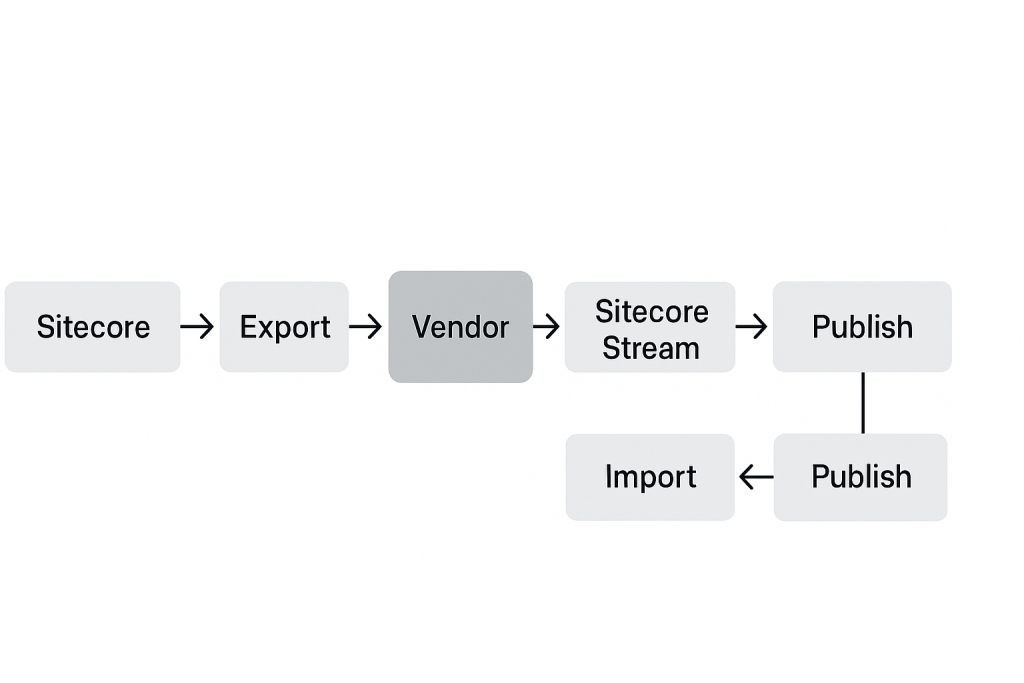
When working with external vendors, Sitecore Stream supports export/import of language versions.
- Export:
- Content is exported as an XML, XLIFF, or Excel package.
- Sent to translation vendor.
- Translation Process:
- Vendor fills in localized text.
- Ensures formatting and field mapping remain intact.
- Import:
- Translated package is imported back into Sitecore.
- Stream aligns content with the correct item and language version.
✅ Pro Tip: Always validate imports before publishing. Misaligned fields can break layouts.
Automated Translation Connectors
For speed, Sitecore integrates with translation connectors such as:
- Lionbridge
- Smartling
- Memsource
- Translations.com (GlobalLink)
These connectors plug into Stream, allowing direct submission and retrieval of translations without manual export/import.
✅ Best Practice: Use connectors for high-volume, fast-turnaround content (e.g., product catalogs). Use human translators for nuanced marketing/branding content.
Tracking Translation Progress
Stream gives editors a dashboard-like view of translation status. Example columns:
| Item | English | French | German | Spanish |
|---|---|---|---|---|
| Homepage | ✅ Published | 🕒 In Review | ❌ Missing | ✅ Published |
| About Us | ✅ Published | ✅ Published | 🕒 In Translation | ❌ Missing |
This eliminates the need for messy spreadsheets.
Avoiding Common Pitfalls
- Mismatched Fields
- If templates aren’t properly designed, translations can overwrite shared fields.
- Solution: Audit field settings (Shared vs. Unversioned vs. Versioned).
- Publishing Too Early
- Without workflow enforcement, untranslated items may go live.
- Solution: Require review stage approval before publishing.
- Overloading Translators
- Dumping entire content trees at once creates bottlenecks.
- Solution: Prioritize content (homepage, legal pages, marketing pages first).
- Ignoring Metadata
- Translating body text but leaving titles, descriptions, and alt text in English hurts SEO.
- Solution: Include metadata fields in translation scope.
Quality Control in Translations
- Spellcheck & Grammar Tools: Integrate QA steps.
- Consistency Checks: Ensure repeated terms (e.g., product names) are translated the same way.
- Cultural Review: Validate imagery and examples are regionally appropriate.
✅ Example: A “snow sale” campaign might make sense in Canada, but not in Brazil.
Example Workflow in Action
Scenario: Launching a multilingual campaign for a new product line.
- Marketing team creates English master content.
- Stream generates versions in French, German, and Spanish.
- Items automatically assigned:
- French → Central translation vendor.
- German → Regional team.
- Spanish → External agency.
- Each returns translations → reviewers approve → Stream marks complete.
- All languages published simultaneously for global launch.
Result: Aligned, on-time launch with clear governance.
Troubleshooting & Pitfalls
Even with Sitecore Stream, multilingual management can go sideways if configurations, workflows, or editor habits aren’t aligned. Below we’ll cover the most common issues and how to resolve them.
1. Language Selector Not Visible
Symptom:
Editors can’t see the dropdown to switch languages in Content Editor.
Cause:
- The language was never enabled in the system.
- User permissions don’t allow access to that language.
Fix:
- Go to Control Panel → Localization → Add a New Language.
- Verify the culture code.
- Assign language permissions to the user’s role.
- Refresh the Content Editor.
📷 Illustration Idea: Mockup of Content Editor ribbon showing missing vs. visible Language Selector.
2. Versions Not Appearing
Symptom:
The language is enabled, but no versions show up under an item.
Cause:
- Versions were never created.
- Incorrect workflow blocked version creation.
Fix:
- Use Sitecore Stream bulk-create to generate versions.
- Check workflow configuration. Ensure the “Create Version” action is enabled.
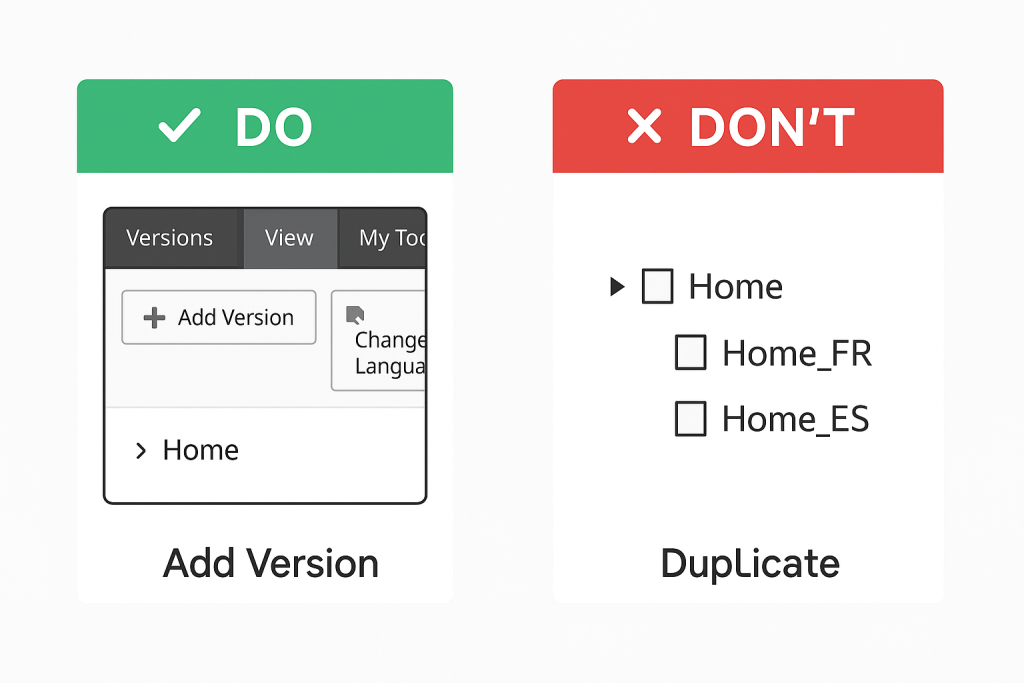
3. Duplicate Items Instead of Versions
Symptom:
Instead of multiple versions, editors accidentally created duplicate items (e.g., /Home_FR, /Home_ES).
Cause:
- Misunderstanding of Sitecore’s language versioning model.
- Editors manually cloned items instead of creating versions.
Fix:
- Audit the content tree.
- Merge duplicates back into the correct master item.
- Train authors: Always use “Add Version,” not “Duplicate Item.”
📊 Diagram Idea: Side-by-side tree showing wrong (duplicate items) vs. correct (single item with multiple versions).
4. Workflow Blocks Publishing
Symptom:
Localized content is ready, but can’t be published.
Cause:
- Workflow requires an approval step.
- Item stuck in “In Translation” or “In Review” state.
Fix:
- Move the item manually through the workflow (if permissions allow).
- If stuck: check workflow definitions in /sitecore/system/Workflows.
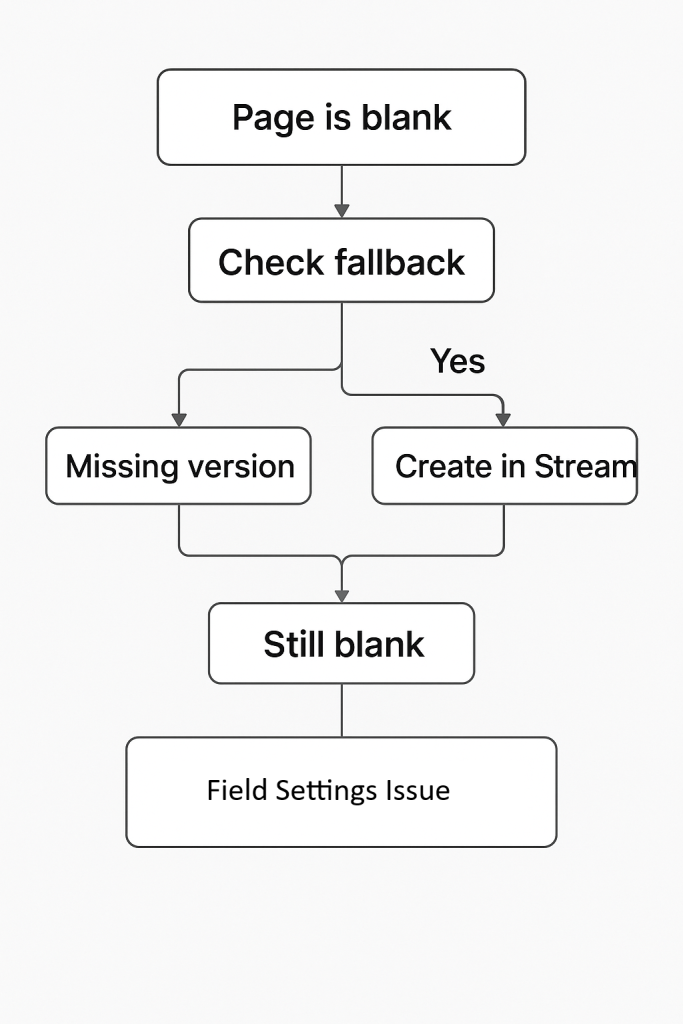
5. Missing Fallback Content
Symptom:
Pages show blank fields when translations are missing.
Cause:
- Fallback not configured.
- Wrong field type (shared/unversioned misapplied).
Fix:
- Enable Item Language Fallback in Sitecore settings.
- Verify field-level fallback configuration.
- Ensure fallback doesn’t expose legally risky content (e.g., disclaimers).
6. Performance Issues with Large Language Trees
Symptom:
Slow response times when managing items across 20+ languages.
Cause:
- Large volume of versions.
- Inefficient workflows or indexing.
Fix:
- Optimize Lucene/Solr indexes.
- Use Sitecore Stream filters to work only with relevant languages.
- Consider archiving old versions not needed in production.
7. Metadata Left Untranslated
Symptom:
Pages look localized, but SEO titles, descriptions, and alt text remain in English.
Cause:
- Metadata fields not included in translation workflow.
- Editors focused only on body text.
Fix:
- Audit all templates.
- Add metadata fields to workflows and export packages.
- Train translators on importance of SEO fields.
8. Broken Links After Translation
Symptom:
Links in localized versions point to English pages.
Cause:
- Internal links weren’t updated for localized structure.
- Translators copied/pasted raw text instead of using Sitecore link manager.
Fix:
- Use Sitecore’s internal linking tools (not static URLs).
- Run the Broken Links Report after translation.
9. Media Assets Not Localized
Symptom:
Localized pages still show English PDFs/images.
Cause:
- Media library not organized by language.
- Editors didn’t upload alternate language assets.
Fix:
- Use media folders by language (e.g.,
/media/fr). - Configure templates to pull media from localized folders.
- Document process for regional marketing teams.
10. Overwriting Shared Fields
Symptom:
Translators change a shared field (e.g., product SKU), and it changes across all languages.
Cause:
- Wrong template design: critical fields set as Shared instead of Versioned.
Fix:
- Audit templates.
- Convert fields to Versioned where appropriate.
- Test in lower environments before rollout.
11. Confusion Between Language + Region
Symptom:
“French” content doesn’t work for both France and Canada audiences.
Cause:
- Only
fr-FRwas created, ignoringfr-CA. - Editors assumed “French is French.”
Fix:
- Add distinct culture codes for each target market.
- Avoid mixing translations across locales.
✅ Example: Date formats differ — 31/12/2025 in France vs. 12/31/2025 in Canada.
12. Translation Bottlenecks
Symptom:
Content piles up in the “In Translation” stage.
Cause:
- Too much content exported at once.
- Limited translator capacity.
Fix:
- Prioritize critical content.
- Use partial exports in Stream (homepage first, then secondary pages).
- Balance workload between centralized and regional teams.
Troubleshooting Checklist
Whenever issues arise, run through this quick checklist:
- ✅ Is the language enabled?
- ✅ Was the version created correctly?
- ✅ Is the workflow state correct?
- ✅ Are field types configured properly?
- ✅ Is fallback configured?
- ✅ Has metadata and media also been translated?
Lessons Learned from Real Projects
- Train Editors Early: Most mistakes come from editors not understanding versioning vs. duplication.
- Governance Beats Chaos: Define who owns which languages before scaling.
- Audit Often: Run checks for untranslated metadata, broken links, or missing media after every major translation cycle.
- Don’t Rely Solely on Fallback: It’s a safety net, not a solution. Users notice when “localized” sites suddenly show English.
Best Practices & Governance
Multilingual Sitecore projects often fail not because the technology can’t handle it, but because processes, governance, and discipline are missing. Below are proven strategies and models that ensure long-term success.
1. Establish a Master Language Strategy
Every Sitecore instance should have a clearly defined “master” language — the one from which all other languages are derived.
- Typically English (en) for global organizations.
- Could be another language if business is regional (e.g., German for DACH market).
Why It Matters:
- Provides a single source of truth.
- Ensures consistency in workflows (all content starts in master, then branches out).
- Reduces confusion when translations conflict.
✅ Best Practice: Never allow multiple “masters.” If content originates in both English and German, choose one as the authoritative version and designate the other as “regional primary.”
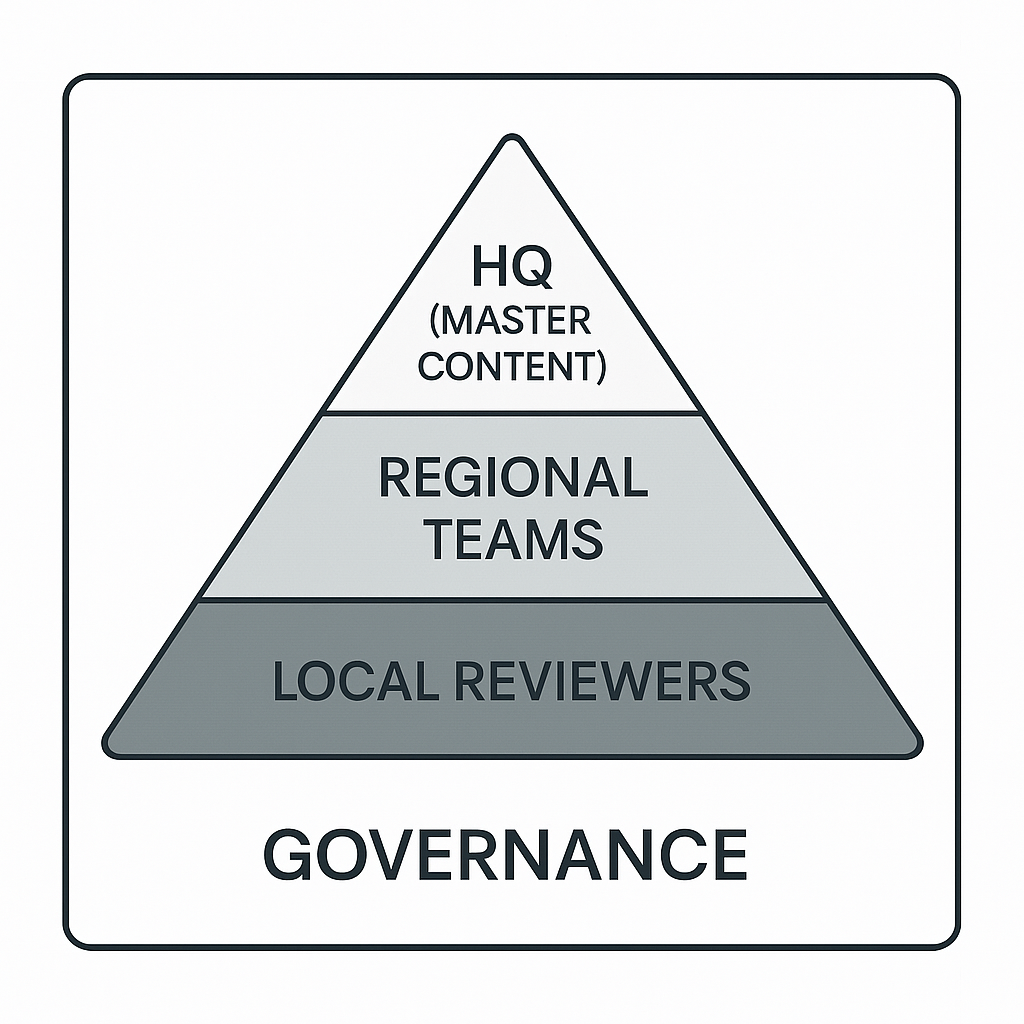
2. Governance Models for Multilingual Content
There are three primary governance models:
Centralized Governance
- Global HQ controls everything.
- Master language created, translations outsourced, local teams have minimal input.
Pros:
- Consistent messaging.
- Easier to manage workflows.
Cons:
- Local teams feel disconnected.
- Slower updates (bottlenecks at HQ).
Decentralized Governance
- Regional teams own translations and have full autonomy.
- Stream routes items directly to local teams.
Pros:
- Faster turnaround.
- More cultural accuracy.
Cons:
- Messaging drifts.
- Harder to maintain consistency.
Hybrid Governance
- Most common model.
- HQ owns master content + critical items (legal, product).
- Regional teams localize everything else.
Pros:
- Balance of consistency + local adaptation.
- Clear ownership boundaries.
Cons:
- Requires strong communication.
3. Metadata and SEO Localization
One of the most overlooked aspects of multilingual Sitecore sites is metadata. Translating body text without metadata creates SEO blind spots.
Must-Translate Fields:
- Page Title
- Meta Description
- Keywords (if used)
- Alt Text for Images
- Open Graph Titles/Descriptions
✅ Best Practice: Train translators on SEO basics — direct word-for-word translations don’t always capture search intent in local languages.
Example:
- English keyword: “Car Insurance” → French: “Assurance Auto” (not “Assurance Voiture”).
4. Media and Digital Assets
Localization isn’t just about text. Images, PDFs, and videos often need adaptation:
- Images: Avoid culture-specific visuals unless localized (e.g., U.S. Thanksgiving imagery may confuse European users).
- PDFs: Store localized versions in separate folders (
/media/fr,/media/de). - Videos: Add subtitles or dub audio when possible.
✅ Tip: Use Sitecore Stream’s bulk creation to generate media placeholders in every language, even if assets aren’t ready yet. This ensures consistency.
5. Permissions by Language
Not every editor should touch every language.
- Assign roles like “French Content Author” or “Spanish Reviewer.”
- Restrict access so English editors don’t accidentally overwrite French versions.
- Use workflow permissions to enforce accountability.
📷 Illustration Idea: Mockup of user role assignment showing “Author (EN only)” vs. “Reviewer (FR only).”
6. Content Lifecycle Management
Managing multiple languages isn’t just about creation — it’s about keeping everything in sync.
Common Scenarios:
- Master version updated → translations must also update.
- Legal text changes → all languages must refresh within 48 hours.
- Old campaigns need deactivation in all locales.
✅ Best Practice: Use Stream dashboards to track outdated translations (e.g., FR version still on v1 while EN is on v3).
7. Scaling to 20+ Languages
As organizations expand globally, scaling becomes the challenge.
Tips for Scaling:
- Group by region: Launch content for “Europe” first, then “APAC.”
- Automate with connectors: Don’t manually export/import at scale.
- Monitor performance: Indexes and workflows need optimization to handle heavy multilingual trees.
- Prioritize content: Not all pages need all languages (e.g., careers page may only need EN + local).
8. Security and Compliance
Multilingual sites must also meet legal and compliance standards.
- GDPR (EU): Consent banners and privacy policies must be translated.
- Canada: Federal and provincial sites must support French.
- Accessibility (WCAG): Alt text must be localized for screen readers.
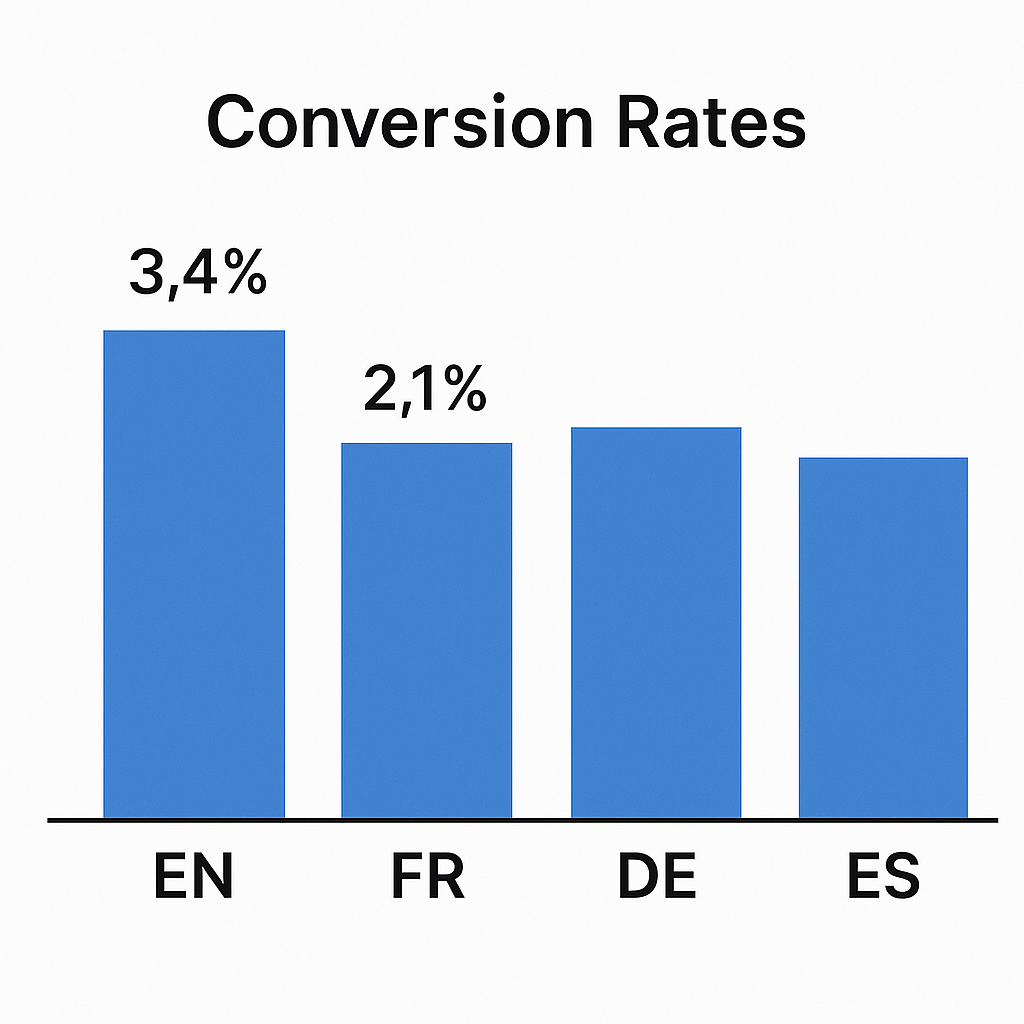
9. Analytics and Reporting by Language
Measuring performance across languages is essential.
- Use Sitecore Analytics to filter reports by language.
- Compare bounce rates across locales (may reveal poor translations).
- Track conversions per language to justify translation investment.
Continuous Training and Documentation
Technology and workflows are only as good as the people using them.
- Provide training sessions for editors on versioning vs. duplication.
- Create playbooks that outline step-by-step processes.
- Keep documentation updated as governance evolves.
Advanced Use Cases
Now that governance is in place, let’s briefly touch on advanced use cases:
- Translation APIs: Automate export/import using Lionbridge, Smartling, etc.
- Personalization by Language: Deliver French content to Canadian users but English fallback to tourists.
- Regional Campaigns: Run campaigns only in certain languages.
- A/B Testing by Language: Compare different headlines in different locales.
Conclusion
Creating and managing language versions in Sitecore XP with Sitecore Stream isn’t just a technical process — it’s a strategic framework for global digital success.
By following:
- Strong master language governance,
- Well-defined translation workflows,
- Proper use of Sitecore Stream automation, and
- Ongoing editor training and audits,
…organizations can scale confidently to dozens of languages while maintaining quality, compliance, and brand consistency.
The investment in doing multilingual content management right pays off in:
- Faster global launches.
- Higher engagement in local markets.
- Stronger brand credibility worldwide.