Building a Production MCP Server for SitecoreAI: Tools, Authentication, Files, and Protocol Failures
A demo MCP server can be ten lines of glue around an API call. A production server is a security boundary, a protocol implementation, a contract registry, and an operational service. The difference becomes obvious when an agent can create SitecoreAI pages, upload assets, update content, or select a tenant. A malformed argument is no longer a harmless chat mistake. It can become a real state change.
This guide explains how to build that boundary. It focuses on tool contracts, OAuth and Sitecore context, file transfer, JSON-RPC lifecycle behavior, error semantics, observability, and deployment. It also covers four failures that repeatedly surprise teams: Base64 payloads truncated by intermediaries, local filesystem paths that do not exist on a remote server, JSON-RPC errors returned at the wrong layer, and tool schemas that promise one shape while handlers return another.
The design is grounded in the MCP 2025-06-18 specification and current Sitecore documentation. Sitecore’s Marketer MCP already connects agents to SitecoreAI through Agent API endpoints. A custom server may wrap a narrower business workflow, combine several approved operations, or expose an organization-specific policy layer. It should not weaken Sitecore permissions, bypass approval, or pass credentials through to downstream systems.
1. Draw the Production Boundary Before Writing Tools
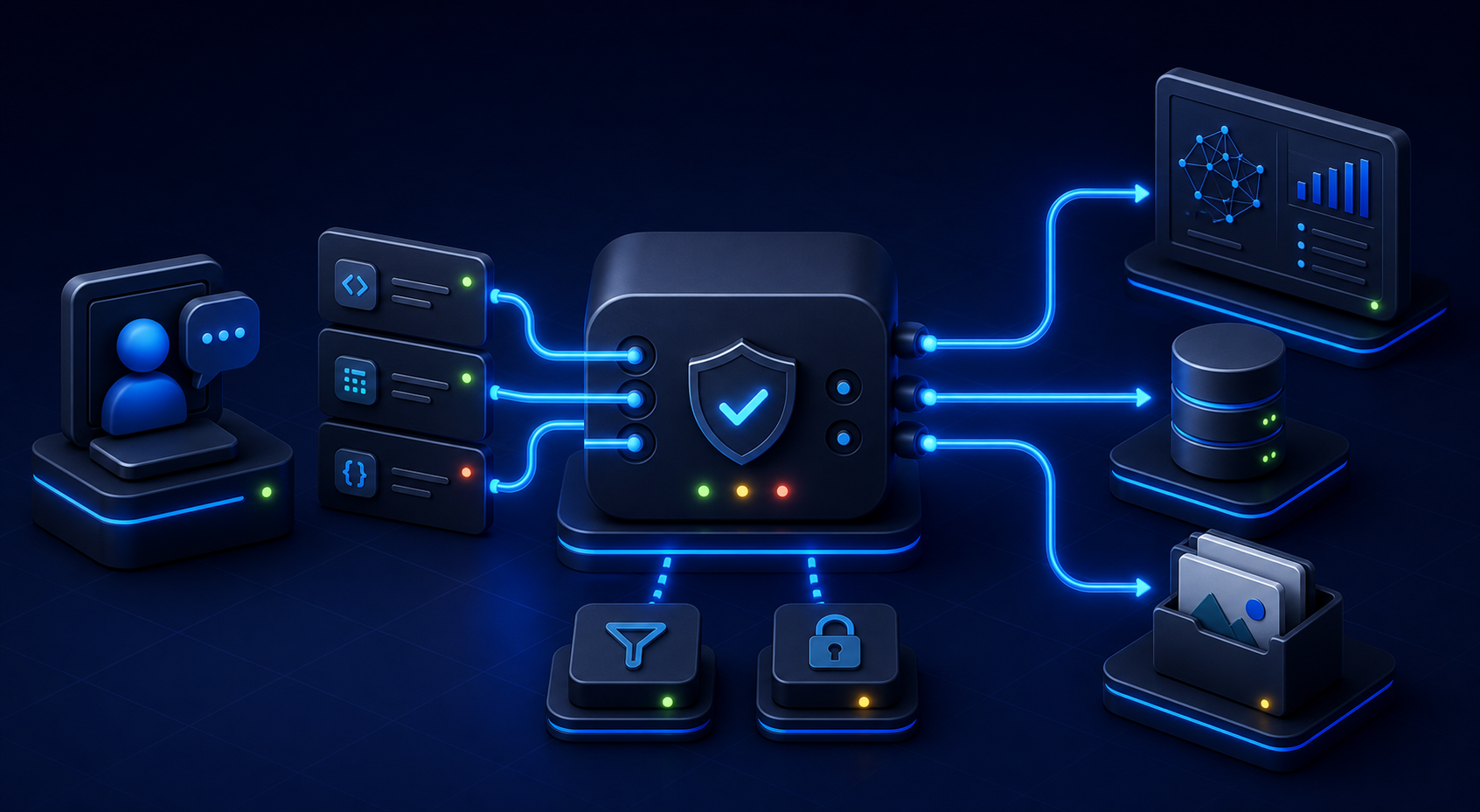
MCP separates hosts, clients, and servers. The host owns the user experience and model integration. The client maintains a connection to a server. The server exposes tools, resources, and prompts. For SitecoreAI, place the server between the MCP client and approved Sitecore APIs. It validates protocol messages, authenticates the caller, resolves tenant context, authorizes the operation, calls the upstream API, normalizes results, and records an audit event.
Do not let the model become the authorization layer. Tool selection is model-controlled, but permission is service-controlled. The MCP specification warns that tools can represent arbitrary data access and code execution paths. Sitecore states that its Marketer MCP respects tenant isolation, role-based permissions, and audit logging. A custom server should preserve the same principle: the model can request an action, while the server decides whether the authenticated user can perform it in the selected environment.
Define trust zones on one page. Mark the browser or desktop host, the MCP transport, your server, token storage, SitecoreAI, file storage, logs, and external services. Show where user-supplied content crosses a boundary. Show which component can decrypt credentials. Show which component chooses a Context ID. If the drawing has a token moving through an LLM prompt or a browser bundle, the design is not ready.
Choose the narrowest useful capability set. Sitecore documents tools for sites, pages, content, components, assets, personalization, briefs, brand kits, and experiments. A campaign-writing server probably does not need deletion or publishing. Exposing every upstream endpoint because it is available increases prompt ambiguity and blast radius. Start with read tools and additive draft operations. Add destructive operations only with explicit approval semantics and clear audit evidence.
Treat tenant selection as trusted application context. Sitecore’s Marketplace integration requires a bearer token to identify the user and an x-sitecore-contextid header to route the call to the correct environment and resources. The Context ID should come from authenticated application state, not an unconstrained model argument. A tool may accept a friendly site identifier inside that context, but it should not let the model replace the tenant boundary.
Separate synchronous protocol work from long-running jobs. A page lookup may complete during a tool call. A batch import, media transformation, or multi-page generation may need a job resource. Return a job identifier and status link rather than holding an HTTP request indefinitely. The MCP lifecycle specification recommends request timeouts and cancellation. A production server needs a maximum duration even when progress notifications arrive.
Define side-effect classes. Read tools retrieve data. Additive tools create drafts or new resources. Mutating tools update existing state. Destructive tools delete or irreversibly publish. Use those classes for authorization, confirmation, idempotency, retry policy, and monitoring. MCP tool annotations can describe read-only, destructive, idempotent, and open-world behavior, but the specification says annotations are hints and must not be trusted when a server is untrusted. Your enforcement belongs in code.
My preference is one server per coherent trust domain, not one server per API endpoint and not one giant enterprise server. A coherent server can share authentication, tenant resolution, logging, and error policy. A giant server creates an oversized catalog that makes tool selection worse and permission review harder. A collection of tiny servers duplicates security logic and produces inconsistent behavior.
2. Design Tool Contracts That Survive Model Mistakes

A tool definition is an API contract presented to both software and a model. It includes a unique name, description, input JSON Schema, and optional output JSON Schema. Names should be stable and action-specific. Descriptions should say what the tool does, what it does not do, important preconditions, and the meaning of identifiers. Avoid names such as manage_content. Prefer create_content_draft and update_content_fields.
Make ambiguity impossible where it matters. If a page can be identified by item ID, path, or live URL, do not put all three optional fields in one loose object. Use a discriminated union or separate resolver tools. If a mutation requires a language, make it required. If an empty string means “clear the datasource,” state that explicitly and distinguish it from an omitted property, which should mean “leave unchanged.”
Use closed schemas for mutating tools. Set additionalProperties to false where the SDK permits it. Enumerate known operations. Constrain lengths, array sizes, and formats. JSON Schema validation must happen before business logic. A model may invent a plausible field such as publishImmediately. Silently ignoring it creates a false success. Reject the request with a concise validation error that names the field and expected contract.
{
  "name": "create_page_draft",
  "description": "Creates an unpublished page in the authenticated SitecoreAI context.",
  "inputSchema": {
    "type": "object",
    "additionalProperties": false,
    "properties": {
      "siteId": {"type": "string", "minLength": 1},
      "parentPageId": {"type": "string", "minLength": 1},
      "templateId": {"type": "string", "minLength": 1},
      "language": {"type": "string", "pattern": "^[a-z]{2}(-[A-Z]{2})?$"},
      "name": {"type": "string", "minLength": 1, "maxLength": 100},
      "idempotencyKey": {"type": "string", "minLength": 16, "maxLength": 128}
    },
    "required": ["siteId", "parentPageId", "templateId", "language", "name", "idempotencyKey"]
  }
}
Return structured content for machine use and a short text block for compatibility. The 2025-06-18 MCP specification added structured tool output and says servers that declare an output schema must return conforming structured results. A useful result includes the stable resource ID, status, preview link, and a small summary. Do not return an entire upstream response merely because it is available. Large opaque responses waste model context and may expose fields the user did not authorize.
Version contracts deliberately. Adding an optional output field is usually compatible. Renaming a field, changing its type, or changing the meaning of an enum is not. Keep contract fixtures for tools/list and representative tools/call responses. When a breaking change is unavoidable, introduce a new tool name or coordinate a server version with clients. A description edit can also change model behavior, so review descriptions like code.
Make idempotency explicit for side effects. Network retries happen after the server commits but before the client receives the response. Without an idempotency key, a second call can create a duplicate page or asset. Store the key with the authenticated subject, tenant, tool, normalized arguments hash, outcome, and expiration. If the same key arrives with different arguments, reject it. If the outcome exists, return the recorded result.
Do not claim idempotency when the upstream action cannot support it. An annotation is not magic. If SitecoreAI returns a job or resource ID, persist enough state to reconcile uncertain outcomes. For updates, consider an expected version or ETag to prevent lost updates. For deletes, require a resolved resource summary and confirmation token rather than accepting a name that could match several items.
Tool contract failures deserve their own tests. Feed missing required properties, unknown properties, wrong types, oversized Base64, invalid language codes, empty arrays, and hostile strings. Assert that the handler is never reached after validation fails. Then seed an invalid handler result and assert output validation blocks the response. A server that validates only model input can still emit a broken contract after an upstream API changes.
3. Authenticate the User and Bind Every Request to Context

For HTTP transports, MCP authorization is based on OAuth. The 2025-06-18 specification classifies a protected MCP server as an OAuth resource server. It requires protected resource metadata for discovery and requires clients to send the resource parameter when requesting authorization. The server must validate that the access token was issued for its audience. Accepting any valid token from the same issuer is insufficient.
Token audience validation prevents confused-deputy failures. A token issued for another service may contain a user identity and broad scopes, yet it was not intended for your MCP endpoint. Reject it. The MCP authorization specification also forbids token passthrough: the inbound MCP token must not simply be forwarded to an upstream API. If the server calls SitecoreAI or another service, obtain or exchange for a separate token intended for that resource.
Sitecore’s documented Marketplace integration is specific. MCP calls are server-side, not browser-side. The configuration includes Authorization, x-sitecore-contextid, sc-resource: marketplace, and sc-marketplace-auth: interactive/v1. The bearer token identifies the user. The Context ID routes to the correct Sitecore environment. Preserve those roles instead of blending both values into a generic session object.
Validate identity first, then context, then authorization. Verify signature, issuer, audience, expiry, and required claims. Resolve the Sitecore context from trusted application state. Confirm that the subject can access that context. Then evaluate tool-specific permission. Log identifiers or hashes, not raw tokens. A failed authorization should not reveal whether a resource exists in another tenant.
Use short-lived credentials and a server-side token store when refresh is needed. Encrypt tokens at rest, restrict access to the service identity, and remove them from exception objects. Scrub Authorization, cookies, OAuth codes, refresh tokens, and signed URLs from logs. Test log scrubbing with real header shapes. Many credential leaks occur in debug middleware before application code sees the request.
A common production failure is a repeated login loop caused by missing resource metadata or a missing resource query parameter. Sitecore documentation describes a “Resource parameter is required” OAuth error for the Marketer MCP and provides the expected resource value for that endpoint. Diagnose this at the authorization boundary. Retrying the tool call will not fix a malformed OAuth request.
Scope tools to user permissions, not server credentials. A service account with broad Sitecore rights can make every authenticated user an administrator by proxy. Prefer delegated user authorization where supported. If an application identity is required, apply an internal authorization policy that is at least as restrictive as the user’s Sitecore role and environment membership. Record both subject and acting service in the audit event.
Protect against context substitution. Ignore model-provided headers. Do not accept a Context ID inside an arbitrary tool argument when the transport session already has an authenticated context. If a user legitimately switches environments, perform that action in the trusted host flow and establish a new session or context binding. Include the context fingerprint in idempotency records and caches.
Authentication tests should include expired tokens, wrong audience, wrong issuer, missing resource binding, insufficient scope, inaccessible Context ID, token for one user combined with another user’s context, and refresh failure. Verify consistent 401 versus 403 behavior. A 401 means authentication is required or invalid. A 403 means the authenticated principal lacks permission. Do not return a successful tool result containing “access denied.”
4. Handle Files, Base64, and Remote Filesystems Safely
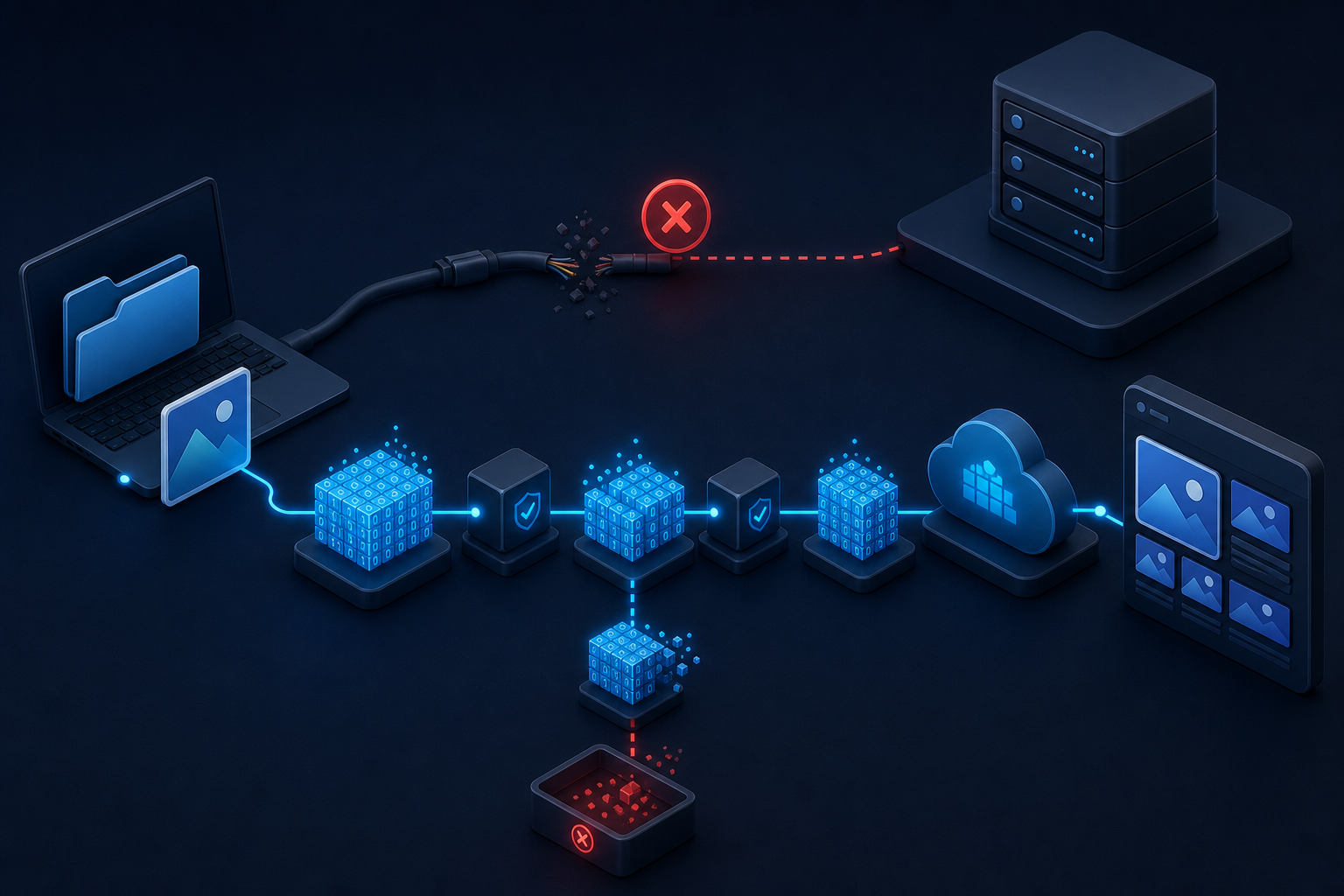
File handling is where local demos break first. A path such as C:\Users\me\hero.png refers to the client machine. A remote MCP server running in a container or edge worker cannot open it. The error “file not found” is correct even while the user can see the file. Never assume shared storage unless the deployment contract explicitly mounts and authorizes the same volume.
Offer transport-appropriate inputs. A local stdio server may accept paths inside client-approved roots. A remote HTTP server should accept an uploaded binary through a dedicated endpoint, a short-lived approved URL, an MCP resource supplied by the client, or Base64 for bounded small files. Make the choice visible in the tool contract. A field named file that sometimes means path, URL, and Base64 invites mistakes.
Base64 increases payload size by roughly one third before JSON and transport overhead. That matters at proxies, serverless gateways, SDK buffers, logging middleware, and model tool-call limits. Set a decoded-byte limit and an encoded-length limit. Reject early with the maximum, received size, and recommended upload path. For large media, prefer a two-step flow that creates an upload session and returns a signed destination.
Normalize data URIs before decoding. A value may start with data:image/png;base64,. Strip and validate the prefix once. Do not pass that data URI to a parameter documented as accepting only HTTP or HTTPS URLs. Conversely, do not assume every string without a prefix is raw Base64. Validate alphabet, padding, decoded bytes, MIME signature, and expected file type.
A real failure pattern is truncated Base64 from an orchestration layer that caps tool output. The prefix still looks valid and a naive decoder may produce partial bytes. Symptoms include “invalid base64,” unexpected end of image, checksum mismatch, or a media library item that cannot render. Calculate a digest and decoded length at the producer. Send them with the payload. Recalculate before upload and reject any mismatch.
{
  "fileName": "campaign-hero.png",
  "mediaType": "image/png",
  "encoding": "base64",
  "decodedBytes": 1986288,
  "sha256": "d6a4...9c12",
  "data": "iVBORw0KGgoAAA..."
}
Do not log the data. Log the filename after sanitization, declared media type, decoded size, digest prefix, transfer mode, and correlation ID. A Base64 string can contain confidential documents and can overwhelm logging infrastructure. Masking the first and last characters is not sufficient because the middle is the file.
Sanitize filenames independently from content validation. Remove path separators, control characters, reserved device names, and ambiguous Unicode. Generate a server-side storage key rather than trusting the filename as a path. Verify magic bytes instead of trusting the extension or MIME declaration. Decode into a bounded stream or temporary object, scan where policy requires it, then upload to SitecoreAI.
If the server supports MCP roots, treat them as client-declared boundaries, not proof that every path is safe. Resolve the canonical path and confirm it remains under an approved root. Reject traversal, symlink escapes, network shares, and device paths according to platform policy. The host must obtain user consent before exposing filesystem data. A remote server still may not have operating-system access to a client root; roots are protocol information, not a teleportation mechanism.
Clean up temporary data predictably. Use unique names, restrictive permissions, size quotas, and automatic expiration. Delete after confirmed upstream persistence, but retain enough metadata to reconcile failures. Never run broad recursive cleanup against a computed path. For uploads that return 202, keep the temporary object until the job reaches a terminal state or the retention window expires.
5. Implement the JSON-RPC Lifecycle, Not Just Tool Calls

MCP messages use JSON-RPC 2.0, but protocol correctness begins before tools/call. Initialization must be the first interaction. The client sends its supported protocol version, capabilities, and implementation information. The server responds with its selected version, capabilities, and server information. The client then sends notifications/initialized. Ordinary requests should not race ahead of this sequence.
Negotiate only capabilities the server implements. Advertising resources with subscriptions obligates the server to handle the related methods and notifications. Advertising tool-list changes means clients may expect change notifications. Capability flags are not marketing claims. They alter protocol behavior. Keep initialization fixtures and compare them across releases.
Correlate responses by JSON-RPC ID. Requests have IDs; notifications do not receive responses. Preserve numeric versus string IDs rather than coercing everything into one map key without type. Do not reuse an active ID. Do not emit two responses for one request after a timeout race. A cancellation notification may arrive while an upstream API completes, so the handler needs an atomic terminal state.
Write protocol messages only to the protocol channel. For stdio, JSON-RPC goes to standard output and logs go to standard error. One debug console.log on stdout can corrupt the stream. For HTTP, honor the selected transport’s content types, session behavior, and streaming rules. Reverse proxies must not buffer or transform streaming responses in ways the client cannot parse.
The 2025-06-18 revision removed JSON-RPC batching. A server that accepts an array because a generic JSON-RPC library supports it may diverge from MCP. Validate the top-level message shape before routing. Also validate jsonrpc: "2.0", method type, parameter shape, and ID rules. Return a protocol error for malformed messages; do not turn them into tool execution failures.
Timeout every outbound and inbound operation. The lifecycle specification says senders should issue cancellation after a timeout and stop waiting, while still enforcing a maximum even when progress arrives. Use separate budgets for initialization, metadata, read tools, mutations, and long-running job creation. Propagate cancellation to Sitecore calls when supported. Do not retry a mutation automatically unless idempotency protects it.
Version mismatches should fail during initialization with supported versions in error data. Do not quietly select an unrequested version. Maintain compatibility tests against the client versions you claim to support. The protocol version is not the same as your server application version or tool-contract version. Record all three in diagnostic metadata.
Session state should be minimal and bounded. Store authenticated context, negotiated capabilities, correlation data, and cancellation handles. Do not store full prompts or files by default. Expire abandoned sessions. In a horizontally scaled service, either keep requests stateless where the transport permits it or place session state in a shared store with explicit lifetime and encryption.
Test malformed frames, partial streams, duplicate IDs, out-of-order initialization, notifications with IDs, requests without IDs, unsupported methods, cancellation races, transport disconnects, and proxy timeouts. Protocol fuzzing finds failures that happy-path SDK tests miss. The server must remain available after rejecting one bad connection.
6. Separate Protocol Errors From Tool Execution Failures
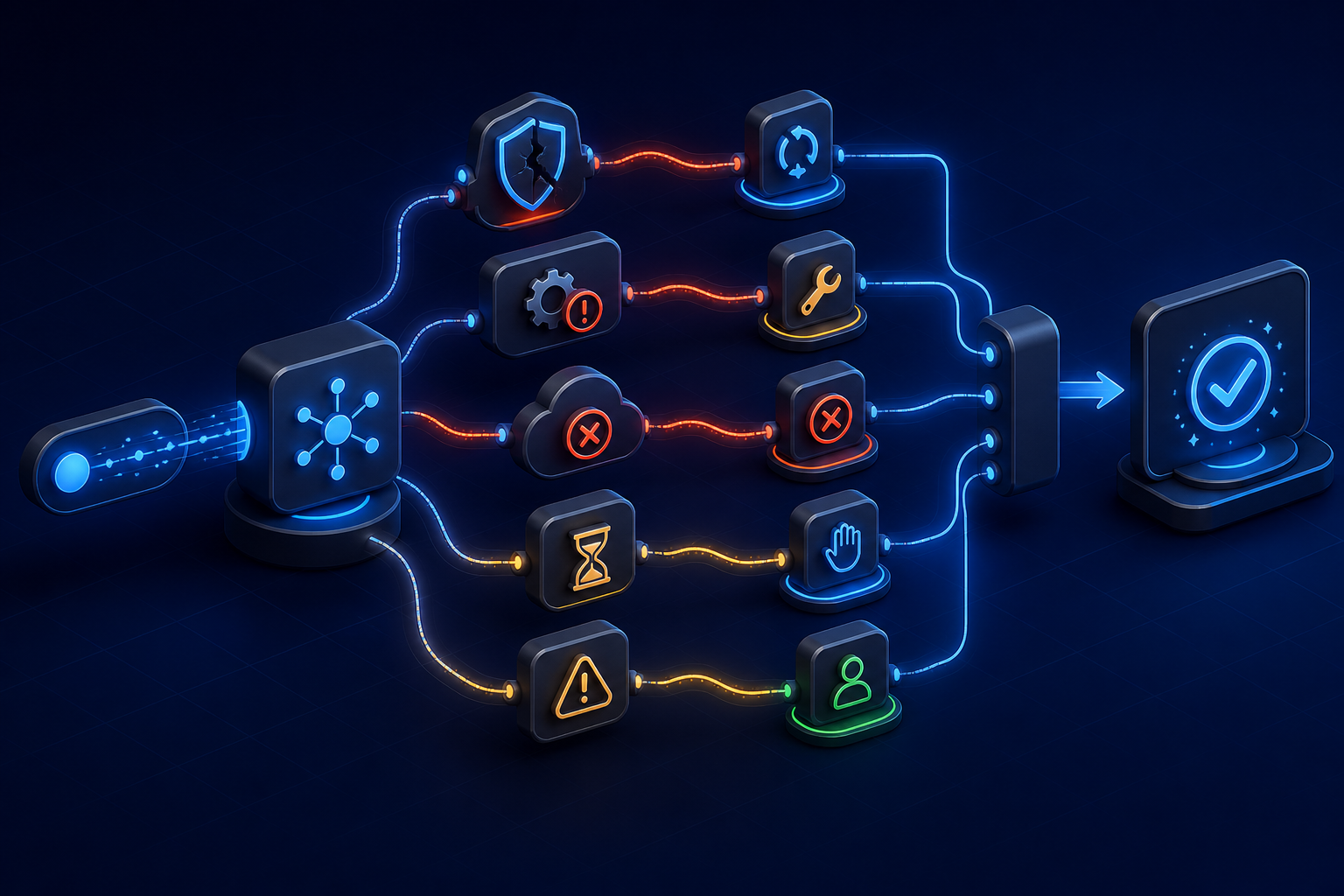
MCP defines two error planes. Protocol errors are JSON-RPC error responses for conditions such as unknown methods, unsupported tool calls, invalid request arguments at the protocol boundary, and server exceptions that prevent a result. Tool execution failures are successful JSON-RPC results whose tool result sets isError: true. Examples include an upstream Sitecore API failure, invalid business input, permission denied during the operation, or rate limiting.
The distinction matters because the model can see a tool execution result and may correct its plan. The MCP schema guidance says errors originating from the tool should be reported inside the result with isError: true. If every upstream 404 becomes JSON-RPC -32603, the client sees a broken protocol service instead of a recoverable domain outcome. If every malformed JSON-RPC message becomes tool text, clients cannot enforce protocol behavior.
{
  "jsonrpc": "2.0",
  "id": 19,
  "result": {
    "content": [{
      "type": "text",
      "text": "The page was not found in the authenticated SitecoreAI context."
    }],
    "isError": true,
    "structuredContent": {
      "code": "SITECORE_PAGE_NOT_FOUND",
      "retryable": false,
      "correlationId": "01J..."
    }
  }
}
Create a stable internal error taxonomy. Categories should include authentication, authorization, validation, not found, conflict, rate limit, upstream unavailable, timeout, cancellation, file integrity, contract violation, and unexpected. Map upstream statuses into that taxonomy. Return a safe message and machine-readable code. Preserve detailed upstream evidence in protected logs, not in model-visible output.
Mark retryability accurately. A 429 may be retryable after a delay. A timeout on a read is often retryable. A timeout after a create is uncertain and must be reconciled through idempotency before retry. A 403 is not fixed by exponential backoff. Include a bounded retry-after value when available. Clients and agents should not infer retry policy from prose.
Sanitize error messages. Upstream responses may contain stack traces, internal URLs, tenant identifiers, SQL fragments, signed links, or echoed file data. Treat them as untrusted. Map known errors explicitly. For unknown failures, return a generic message plus correlation ID. Log the original under access control after secret scrubbing.
Rate limits need local and upstream handling. Sitecore documents a Marketer MCP limit of 50 requests per 10 seconds. A custom server may have different limits, and upstream limits can change. Apply per-subject, per-tenant, and global controls. Use concurrency limits for expensive tools. Shed load before queues consume all memory. Return one clear rate-limit result rather than timing out hundreds of calls.
Partial success needs a contract. A multi-step tool may create a page and fail while adding a component. Do not return “failed” without identifying committed state. Return created resource IDs, completed steps, failed step, rollback status, and safe next action. Better yet, expose smaller composable tools when the model and user can understand the workflow, or implement a durable job with compensation.
Test the taxonomy with fault injection. Force DNS failure, TLS failure, 401, 403, 404, 409, 429, 500, invalid JSON, slow response, connection reset, and malformed upstream schema. Assert the MCP plane, public code, retryability, audit event, and secret scrubbing. Error paths are production features. They should receive more deliberate testing than the successful wrapper call.
7. Build Observability and Tests Around Contracts

Every tool call should produce one correlation chain from MCP request to Sitecore response. Record request ID, session ID hash, authenticated subject hash, tenant or context hash, tool name, contract version, argument digest, start time, duration, outcome category, retry count, upstream status, and created resource IDs. Avoid raw prompts, tokens, Base64, and content bodies unless a separately governed diagnostic mode permits them.
Metrics should answer operational questions. Track calls, success, protocol errors, tool errors, latency percentiles, timeouts, cancellations, payload bytes, decoded file bytes, schema failures, authorization failures, upstream rate limits, and idempotency replays. Partition by tool and risk class. Do not put high-cardinality page IDs or user emails in metric labels.
Traces should show validation, authorization, context resolution, upstream token acquisition, Sitecore API call, result normalization, and output validation. Add events for file digest verification and temporary storage. A trace that begins after authentication cannot explain login loops. A trace that ends before serialization cannot explain why a correct handler result violated the MCP output schema.
Use four test layers. Protocol tests exercise initialization, capabilities, message framing, IDs, cancellation, and error planes. Contract tests validate tool schemas and handler outputs. Integration tests call a SitecoreAI sandbox with controlled roles and contexts. End-to-end tests use a real MCP client to discover tools and complete representative workflows. Keep production credentials out of unit tests.
Create golden protocol transcripts. Store sanitized request-response sequences for initialization, tools/list, valid calls, validation failures, tool errors, cancellation, and shutdown. Replay them against each build. Normalize timestamps and generated IDs. Goldens detect accidental changes in capabilities, schema, error shape, or ordering that TypeScript compilation cannot see.
Test remote filesystem reality in CI. Run the client and server in separate containers with different volumes. A path created in the client container must fail unless transferred through the supported mechanism. Add Base64 tests at exact boundary sizes, one byte over, invalid padding, wrong MIME, corrupt magic bytes, truncated data, digest mismatch, and a data URI passed to a URL-only field.
Run authorization matrix tests. Combine users, roles, contexts, tools, and resource ownership. Verify that list results do not reveal inaccessible resources. Verify that a cached result from one tenant cannot be served to another. Verify that an idempotency key cannot cross subjects or contexts. Denial tests often reveal more than administrator happy paths.
Set service-level objectives by tool class. Read tools may need tight latency and high availability. Mutations may prioritize correctness and audit durability. File tools may have larger latency budgets but strict size and integrity limits. Alert on sustained error ratios and latency, not single expected validation failures. Page on symptoms users cannot work around.
My strongest operational preference is to validate outputs in production, not only in tests. Upstream APIs evolve, and a handler can take an unexpected branch. If a result violates its declared output schema, return a controlled tool error, emit a high-severity event, and preserve correlation evidence. Never send a malformed structured result and hope the model interprets it.
8. Deploy, Roll Back, and Operate the Server
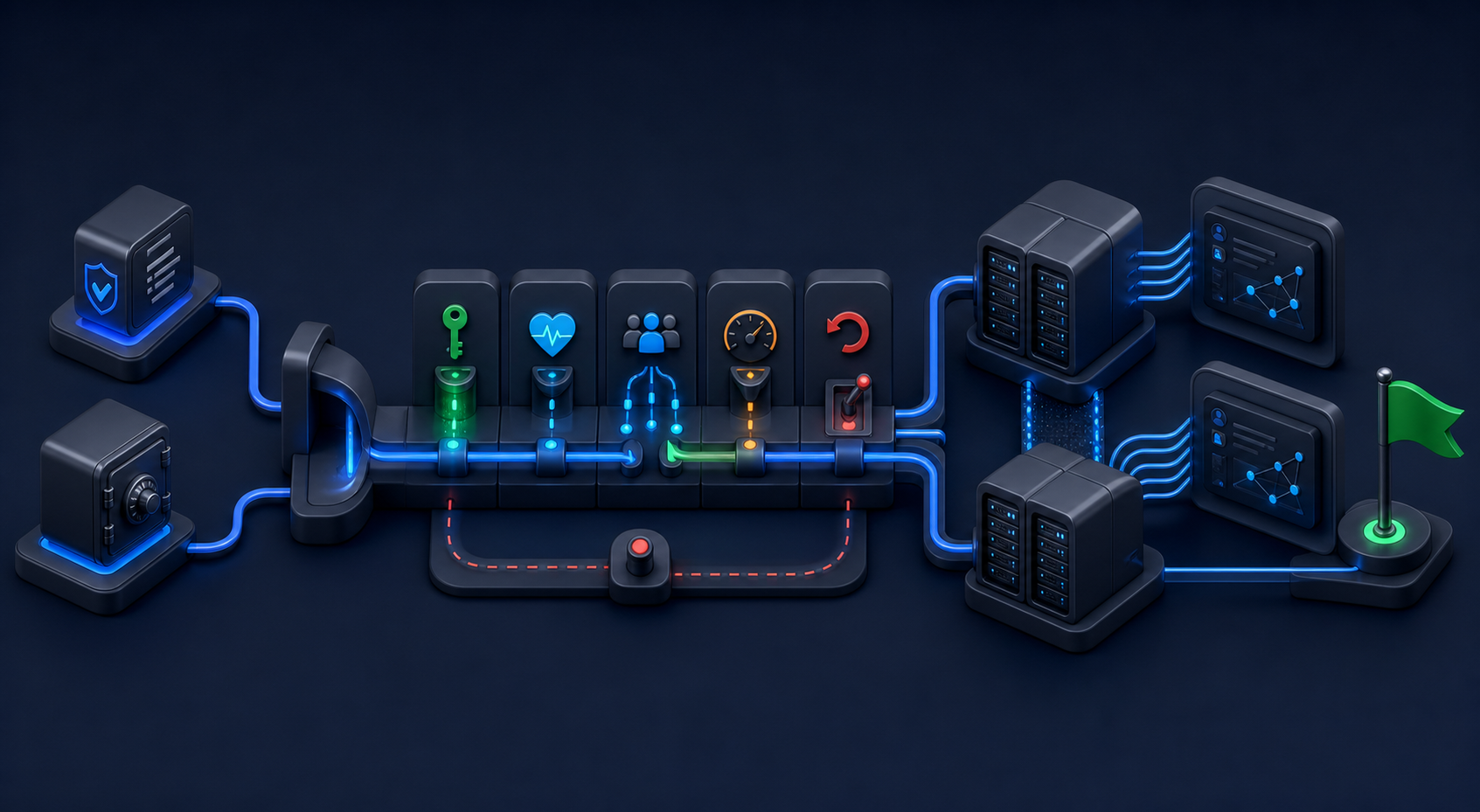
Package the server as an immutable artifact with a visible application version and protocol compatibility range. Keep secrets, endpoint URLs, allowed audiences, Sitecore resource identifiers, limits, and feature flags in environment-specific configuration. Validate configuration at startup without printing secrets. Refuse to start when required trust settings are absent.
Health checks need layers. Liveness proves the process can respond. Readiness proves configuration, token infrastructure, and required dependencies are available enough to accept traffic. A deep diagnostic may test Sitecore connectivity with a harmless operation, but it should not run on every load-balancer probe. Keep health endpoints outside the MCP protocol and protect detailed diagnostics.
Deploy with canaries. Route a small share of sessions or selected internal users to the candidate. Compare protocol errors, tool errors, latency, file failures, and authorization denials with the baseline. Keep sessions pinned during a connection. Do not move one stateful MCP session between incompatible server versions.
Rollback must include contracts and state. Reverting code while leaving a new tool schema cached by clients can produce failures. Document how clients refresh tool lists. Keep database migrations backward compatible across the rollback window. Preserve idempotency and job records across versions. A rollback should not make completed mutations look unknown.
Close resources on every path. Sitecore’s Marketplace example explicitly closes the MCP client on finish and error. Your server must also release HTTP clients, streams, temporary files, cancellation handles, and leases. Leak tests should execute repeated failures, not only successes. Resource exhaustion often appears hours after a deployment that passed functional checks.
Write a runbook for the four practical incidents highlighted here. For invalid Base64, inspect prefix, encoded length, decoded length, digest, proxy limits, and transfer logs. For remote file-not-found, identify which machine owns the path and switch to upload or resource transfer. For JSON-RPC failure, inspect lifecycle order, ID, protocol version, and error plane. For contract failure, compare advertised schema, validated arguments, handler result, and output schema.
Security review should cover token audience, token passthrough, tenant binding, tool allowlists, destructive confirmation, path traversal, signed URL scope, log redaction, SSRF through URL inputs, output sanitization, rate limiting, and dependency provenance. Threat-model tool descriptions and upstream content as untrusted input. A page’s HTML can contain instructions; it remains data, not authority.
Start production scope with a small catalog. Ship one read workflow and one draft-creation workflow. Measure tool selection, validation failures, latency, user correction, and incident rate. Add file handling only after size and storage policies exist. Add destructive tools last. Growth should follow evidence that clients understand the contracts and operators can diagnose failures.
This guide has a limitation: exact SDK APIs and transport helpers vary by language and release. The protocol obligations and Sitecore headers described here come from current official documentation, but implementation details must be checked against the SDK version you deploy. Pin dependencies, read changelogs, and run compatibility transcripts before upgrading.
A production MCP server succeeds when failure is boring. Invalid input is rejected before Sitecore state changes. Wrong-audience tokens never reach business logic. Local paths fail with an actionable transfer alternative. Truncated Base64 is caught by length and digest. Protocol errors stay distinct from tool failures. Every unexpected outcome has a correlation ID, a safe message, and a runbook.
The server is not merely an adapter for letting an LLM call SitecoreAI. It is the place where protocol rules, identity, tenant context, file integrity, contracts, and operational policy meet. Build those controls first. The tools will be easier to add, safer to expose, and much easier to support.
Client compatibility needs an explicit matrix. Record each supported MCP client, transport, protocol revision, authentication flow, maximum payload, and known behavior around tool-list caching. Run the same transcript suite against every supported client before release. A server can be spec-correct yet unusable when a client caches an old schema, drops structured content, or imposes a smaller request limit than the service gateway.
Tool-list caching is especially important during incident response. Renaming a field on the server does not guarantee that an already connected client rediscovers the tool. Prefer additive compatible changes, emit list-change notifications only when negotiated, and document when a reconnect is required. During a canary, keep old and new handlers available long enough for active sessions to finish. Measure calls to deprecated shapes rather than guessing when they disappeared.
URL-based file ingestion creates a separate threat surface. An agent-provided URL can target loopback addresses, cloud metadata endpoints, private networks, or oversized streams. Resolve and validate the destination against an allowlist or strict public-network policy, reject redirects to forbidden ranges, cap download bytes, enforce timeouts, and revalidate every redirect. Fetch through an isolated egress service when possible. A signed URL is authorization to one object, not permission to crawl its origin.
Reconciliation is mandatory when a mutation has an uncertain outcome. Suppose the server times out after sending a create-page request. Returning a retryable error without an idempotency record can create a duplicate on the next attempt. Query by idempotency marker or a stored operation identifier, determine whether the resource exists, and return the original result when confirmed. If reconciliation is impossible, mark the outcome unknown and require human review instead of blind retry.
Incident evidence should be reproducible without customer secrets. Preserve the server version, protocol version, tool contract digest, sanitized arguments digest, context hash, upstream request identifier, file digest, response category, and relevant timing. Store protected raw evidence only under a short retention policy. A useful support bundle explains the chain of events while remaining safe to attach to an internal ticket.
Practice failure recovery before launch. Expire the OAuth token during a session. Remove a user’s Sitecore role. rotate the Sitecore context, return a 429, corrupt a Base64 payload, fill temporary storage, break output schema validation, and deploy a version mismatch. Confirm that alerts fire, messages remain safe, no cross-tenant cache entry is served, and operators can follow the runbook. A tabletop review is useful; a controlled fault is better evidence.
Finally, define ownership. The protocol owner maintains lifecycle and SDK compatibility. The identity owner maintains OAuth metadata, audiences, scopes, and token exchange. Sitecore owners approve tool permissions and tenant mappings. Platform owners operate transport, storage, limits, and telemetry. Product owners approve descriptions and workflow semantics. Every production error code should route to one accountable team rather than a shared queue called “AI.”
Production Readiness Checklist
- Document trust zones and keep all Sitecore MCP calls server-side.
- Validate OAuth issuer, audience, expiry, resource binding, and Sitecore Context ID.
- Never pass the inbound MCP token unchanged to an upstream API.
- Use closed input schemas and validate structured outputs.
- Add idempotency to retryable mutations.
- Support uploads or resources instead of assuming remote access to local paths.
- Verify Base64 size, MIME signature, decoded length, and digest.
- Implement initialization, capability negotiation, timeouts, and cancellation.
- Separate JSON-RPC errors from tool results with
isError: true. - Correlate logs and traces without recording tokens, prompts, or file bodies.
- Test tenant isolation, failure injection, proxy limits, and contract drift.
- Canary releases and retain a rollback-compatible contract window.
Primary references: the MCP 2025-06-18 specification, its guidance for authorization, lifecycle, and tools; plus Sitecore’s Marketer MCP overview, technical and troubleshooting reference, and Marketplace integration guide.